Get in Touch with Saiweiglass



Updated June 2026 · Reviewed by the Dongguan Saiwei Glass Co., Ltd. technical team
An industrial touch screen selection guide is a framework for answering six questions at once: which touch technology, which cover glass, which surface coating, which ingress and impact rating, which durability envelope, and how it all mounts and sources. Most buyer guides stop at the housing. This one work from the glass outward, because the cover glass and what’s done to its surface count for more in real-world reliability than the bezel ever will.
An industrial touch screen is a display engineered to survive continuous duty in dust, washdown, vibration, and wide temperature, typically a projected-capacitive (PCAP) or resistive sensor over chemically strengthened cover glass, sealed to an IEC 60529 IP rating, with the touch technology, glass spec, and sealing matched to the operating environment rather than to resolution or brand.
Quick Specs, The Six Decision Layers
| Touch technology | PCAP / 4–8-wire resistive / SAW / infrared (IR) |
| Cover glass | 0.4–3.9 mm; aluminosilicate / soda-lime; CS>450 MPa, DOL>8 µm |
| Surface treatment | AG (anti-glare) / AR (anti-reflective) / AF (anti-fingerprint) / optical bonding |
| Sealing | IP54 → IP65 / IP66 / IP69K (IEC 60529); impact IK01–IK10 (IEC 62262) |
| Durability | Operating temp −20 to +70°C; vibration/shock IEC 60068 |
| Integration | Panel / VESA / open-frame mount; brightness 250–1500+ nits; USB-HID |
Defining an Industrial-Grade Touch Screen
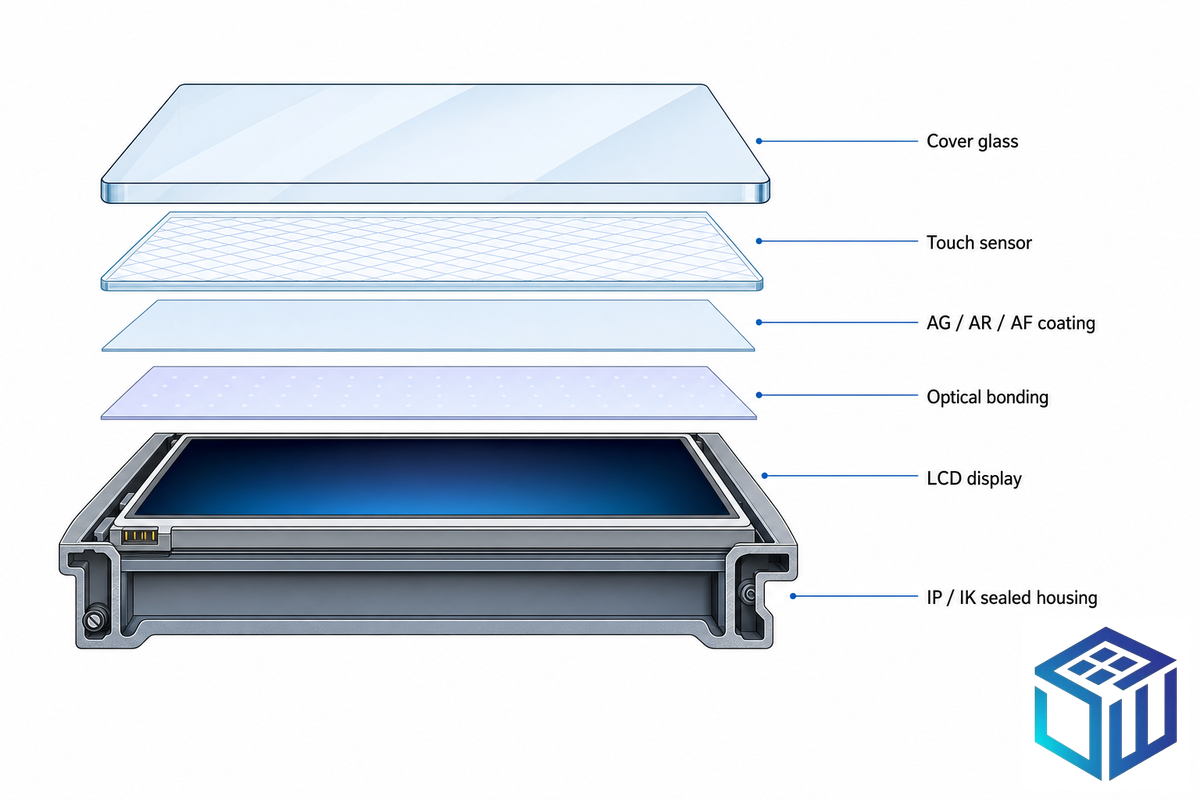
On a datasheet, the word “industrial” isn’t a specification. A consumer touchscreen and an industrial touchscreen can use the same LCD yet diverge on the things that decide a five-year service life in harsh industrial environments: cover-glass strength, ingress sealing, temperature range, and touch-controller tuning. Used in industrial automation and industrial control panels, a consumer-grade panel in the same spot rarely lasts six months because it can’t withstand the duty cycle. Field reports describe consumer panels dropped into washdown bays that chewed through their overlay films, delaminated the optical bond, and corroded the controller board within months — the exact failure modes the six layers below are meant to head off. A practical way to specify is to treat the touchscreen as six independent layers rather than one product.
The 6-Layer Industrial Touch Screen Spec Stack
- Touch technology, how the screen senses a finger, stylus, or gloved hand.
- Cover glass, material, thickness, and how it’s strengthened.
- Surface treatment, AG / AR / AF coatings and optical bonding for readability.
- Environmental sealing — IP (ingress) and IK (impact) ratings.
- Durability envelope — temperature, vibration, shock, and EMI.
- Integration — mounting, size, sensor stackup, and connectivity.
These layers interact. Thicker cover glass raises impact resistance but can blind a projected-capacitive sensor; bumping the IP rating helps a washdown line but adds nothing in a clean control room. Each section below take one layer in turn, with the numbers and standards that let you specify rather than guess — including the glass detail a touch-monitor vendor rarely covers, but which Saiwei Glass builds into layers two and three.
Touch Technology: PCAP vs Resistive (and SAW / IR)
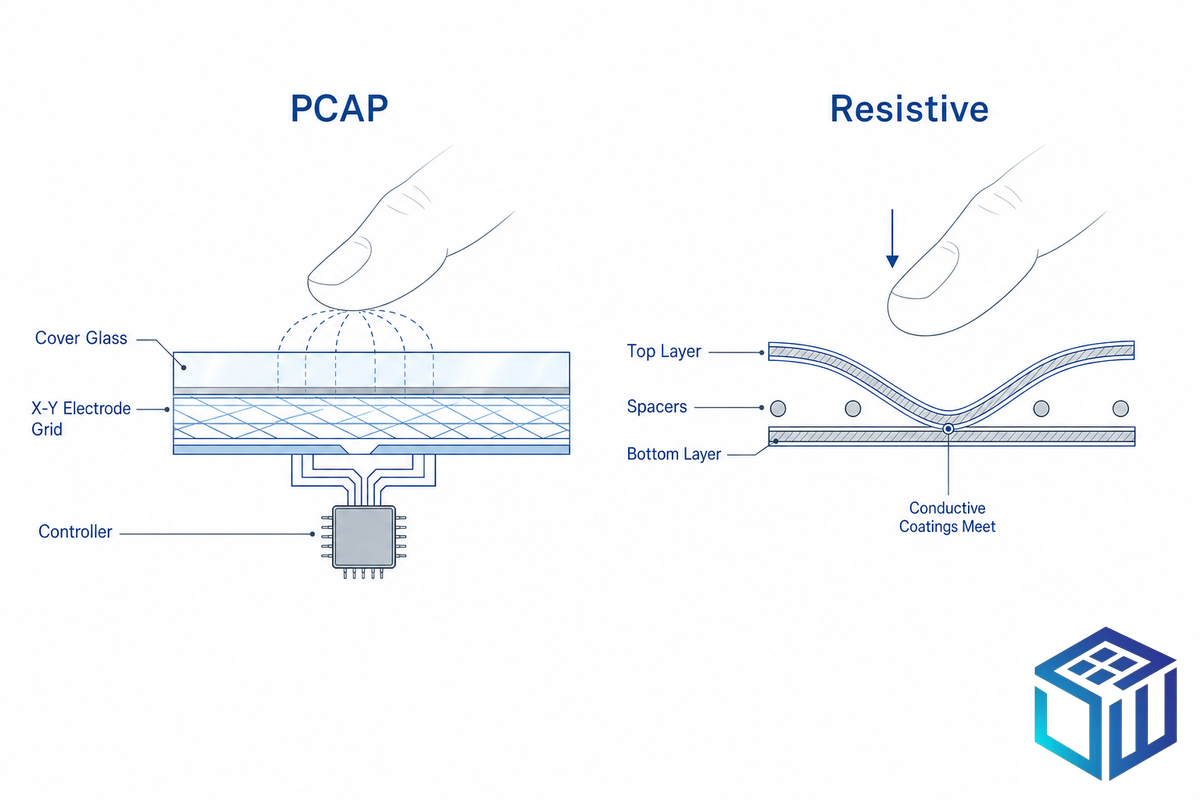
For new industrial designs, projected capacitive (PCAP) is the default and resistive is the considered exception, not the other way around, and not because resistive is obsolete. PCAP senses a finger through an electrostatic grid embedded under the glass, supports multi-touch (usually 10–40 points), and lives behind a sealed, easy-clean glass surface that holds up under continuous industrial use. Resistive senses pressure between two coated layers, works with any stylus or glove, tolerates liquids and contaminants, and costs less, but is single-touch and softer-surfaced. Vendor durability figures commonly cite PCAP around 50 million-plus touches against roughly 30–35 million for resistive, though rated touch life varies by model and should be confirmed on the datasheet.
| Factor | PCAP (projected capacitive) | Resistive |
|---|---|---|
| Multi-touch / gestures | Yes (10–40 points) | No (single-touch) |
| Gloves | Thin/conductive with tuning; thick/insulated unreliable | Any glove, any stylus |
| Liquids / contaminants | Can false-touch on water without water-reject firmware | Tolerant; pressure-based |
| Durability | ~50M+ touches; drift-free, no recalibration | ~30–35M touches; surface wears |
| Optical clarity | High (glass surface) | Lower (film stack) |
| Relative cost | Higher | Lower |
Touch-life figures are typical values reported across industrial display vendors; verify against a specific datasheet.
The main types of touch screen used in industry are projected capacitive touch, resistive touch screens, surface acoustic wave (SAW), and infrared touch (IR touch): capacitive screens detect touch through the glass, while resistive screens register pressure. SAW and IR cover the edges of the range. IR uses an edge grid of beams with no overlay, so it keeps high clarity on large-format kiosks; SAW gives excellent clarity but is sensitive to surface contamination. Across the main touch technologies, for most factory automation and HMI work the real decision is capacitive touch versus resistive, a choice that shape the operator’s user experience and the type of touch input you can accept, and it comes down to five signals.
PCAP-or-Resistive 5-Signal Decision Rule
💡 Apply the rule:
Choose resistive if two or more apply: (1) operators wear heavy or insulated gloves; (2) the screen sees fluid spray, wet hands, or condensation; (3) single-touch button presses are all you need; (4) a passive stylus is required; (5) cost is the hard constraint. Otherwise choose PCAP for multi-touch, optical clarity, a sealed glass surface you can clean, and millions of touch cycles.
Can industrial touch screens be used with gloves?
Yes, but the answer is conditional. Resistive works with any glove because it’s pressure-based. PCAP works with thin or conductive gloves when the controller firmware is tuned for glove mode, but very thick, heavily insulated, or dirty gloves often fail to register even in glove mode. Field practitioners in PLC and embedded forums repeatedly steer heavy-glove, fluid-exposed jobs back to resistive for exactly this reason. If gloves are heavy and the environment is wet, resistive is the safer default.
What touch screen technology is best for industrial applications?
PCAP and modern capacitive touch screens suit the average factory HMI that needs multi-touch, several touch points, and a sealed glass face rated for millions of touch cycles. Resistive wins when workers wear heavy gloves or a stylus and single-touch on a tight budget suffices. Since there’s no universal winner, industrial users frequently run both HMI types.
Cover Glass: Material, Thickness & Chemical Strengthening
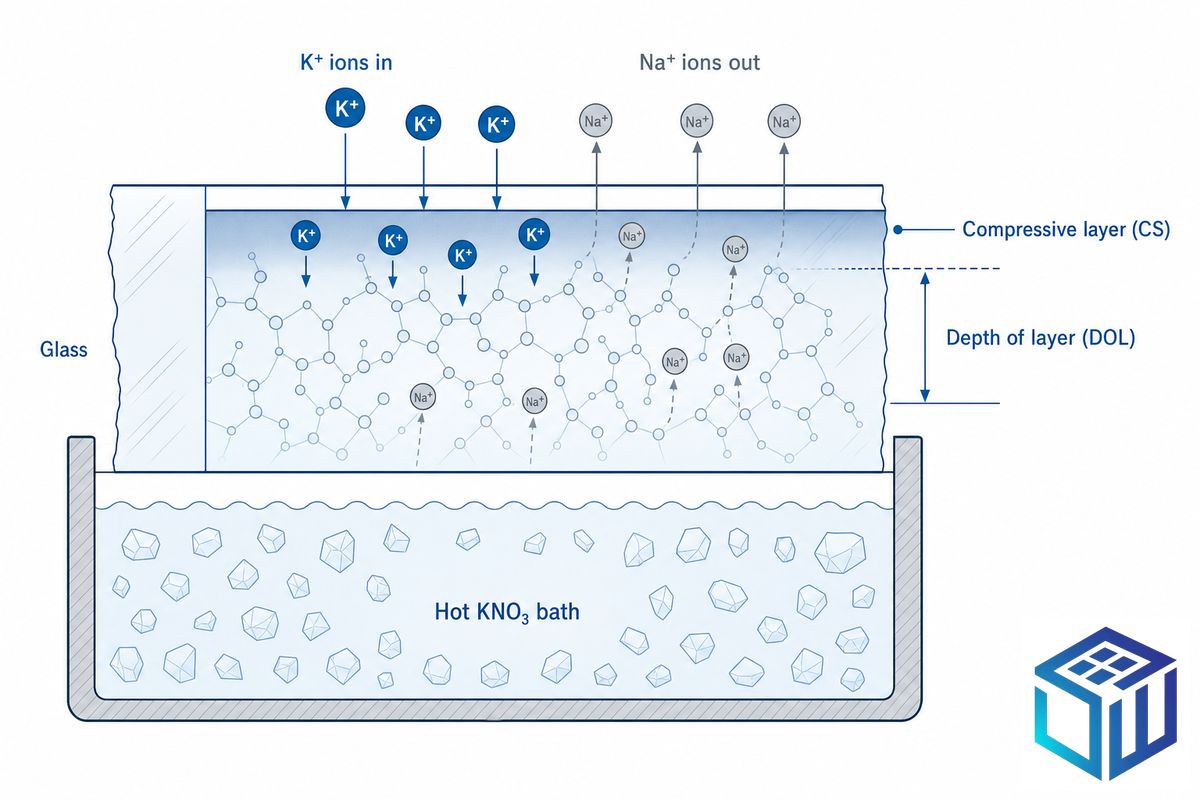
This is the layer monitor guides skip, and it’s where field failures begin. Cover glass decides impact resistance, scratch life, optical clarity, and, for a PCAP touchscreen, whether the sensor can feel a finger at all. Three sub-decisions matter: material, strengthening method, and thickness.
Material. Aluminosilicate glass, the family behind Corning Gorilla, AGC Dragontrail, and Tunghsu Panda, accepts ion exchange far better than ordinary soda-lime-silica (SLS) glass. According to the American Ceramic Society, ion-exchange compressive stress reaches as high as 1,200 MPa in aluminosilicate glasses versus about 800 MPa in soda-lime, and aluminosilicate develops a useful depth-of-layer in roughly two hours where soda-lime needs 24–85 hours. That said, aluminosilicate glass carries a real cost penalty, melting temperatures run 100–200°C higher, so it isn’t automatically the right pick. Soda-lime remains sensible for thicker, lower-stress, cost-driven panels.
In general, a deeper depth of layer leads to improved mechanical properties and fracture resistance; glass-science work published in the ACerS Bulletin indicates that a depth of layer of roughly 40 µm or more is needed to avoid large strength losses from impact or scratching.
Strengthening method. Chemical strengthening (potassium-for-sodium ion exchange) and thermal tempering both build a compressive surface layer, but they part ways at thin gauges: thermal tempering becomes dramatically less effective below 3 mm, while ion exchange keeps working. That’s why thin display cover glass is almost always chemically strengthened, not tempered. Our production chemically strengthened glass targets CS>450 MPa and DOL>8 µm across 0.4–3.9 mm a conservative production-floor guarantee, distinct from the laboratory ceilings above.
Thickness. For PCAP, thickness is a trap. The sensor read a finger through the glass dielectric, so beyond a point thicker glass kills sensitivity. Projected-capacitive design references put typical cover-lens thickness at 0.55, 0.75, or 1.1 mm for mobile devices and up to about 3 mm for kiosks, with mutual-capacitance designs commonly in the 0.7–2.0 mm band, a long-standing range that current PCAP module datasheets still echo.
| Thickness | Typical application | PCAP through-glass touch |
|---|---|---|
| 0.55 mm | Wearables, small handhelds | Excellent |
| 0.7 mm | Handheld terminals, scanners | Excellent |
| 1.1 mm | Industrial HMI panels | Reliable |
| 2.0 mm | Ruggedized / vandal-exposed displays | Reliable with tuning |
| ~3.0 mm | Kiosks, public terminals (self-cap) | Upper limit; firmware-tuned |
📐 Engineering Note — through-glass touch worked example
A vandal-resistant kiosk specs 4 mm cover glass for impact. At 4 mm, a standard mutual-capacitance PCAP sensor (tuned for ~2 mm) loses touch sensitivity and starts dropping touches. The fix isn’t “more glass”: either drop to ~2–3 mm chemically strengthened glass (which at CS>450 MPa already survives the impact case) and keep PCAP, or keep 4 mm and switch to a self-capacitance sensor with firmware re-tuned for the thicker dielectric. Decide the touch technology and the glass thickness together, never in isolation.
One honest caveat: glove, water, and thick-glass performance is set as much by the touch controller’s firmware as by the glass itself. The cover glass is one layer; pair it with a sensor and controller tuned for the same conditions. Compare substrate options with the interactive glass material selector.
Readability: AG, AR, AF Coatings & Optical Bonding
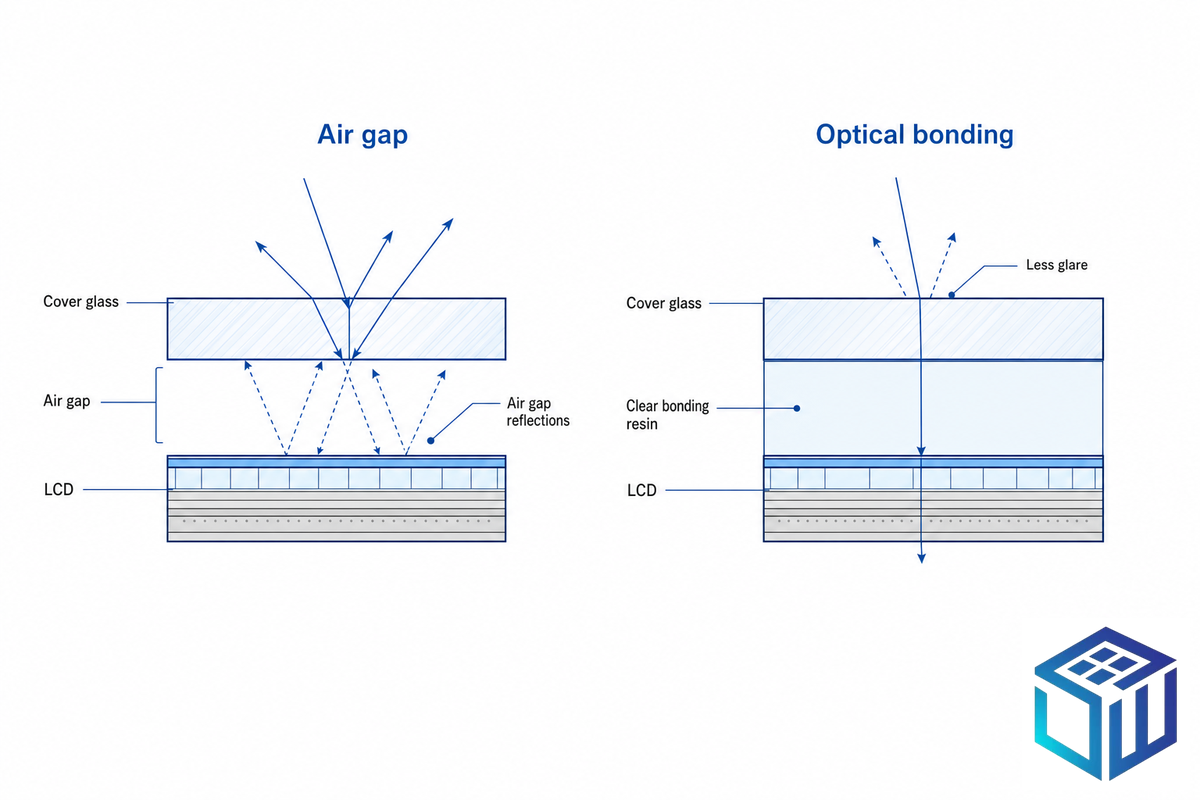
A touchscreen that isn’t readable in its lighting is a failed spec. Readability comes from two places: surface coatings that manage reflection and fingerprints, and optical bonding that removes the internal air gap. Match them to ambient light, then to cleaning needs.
| Treatment | Method & spec | Solves |
|---|---|---|
| AG (anti-glare) | Etch; gloss 5010–7010, haze 4.7–11 | Diffuse glare under overhead lighting |
| AR (anti-reflective) | Vacuum coat; T>94% single-side, >98% double-side | Specular reflection, light loss |
| AF (anti-fingerprint) | Nano coat; water contact angle 105°±5° | Smudges, hygiene, easy cleaning |
AG / AR / AF specifications shown are Saiwei Glass production values; treatments can stack (AG+AR, AG+AF, AR+AF).
Optical bonding vs air gap: which is better for touchscreens?
Optical bonding fills the air gap between cover glass and LCD with a clear resin, eliminating two internal reflective surfaces. Its payoff is real in bright light: industry sources report contrast improvements up to roughly 400% (about four-fold) in sunlight when bonding is paired with an anti-reflective treatment, plus stronger impact resistance and no internal condensation.
Air-gap construction is cheaper and fine indoors. For outdoor, vehicle, or sunlit panels, bond it; for climate-controlled control rooms, an air gap with AG glass usually suffices.
What brightness level (nits) does my application require?
Brightness is measured in nits (cd/m²). As a working rule: 250–400 nits for indoor controlled lighting, 500–800 nits for bright indoor areas near windows, and 1000+ nits for direct outdoor sun. A worked example: a loading-dock terminal facing afternoon sun needs ≥1000 nits, an anti-reflective surface, and optical bonding.
Specifying a 400-nit indoor panel in that spot guarantees an unreadable screen by 3 p.m. Push brightness only as far as the light demand, because higher nits add heat and cost. Our optical bonding services and AG/AR/AF lines cover these readability stacks.
Environmental Sealing: How to Read IP and IK Ratings
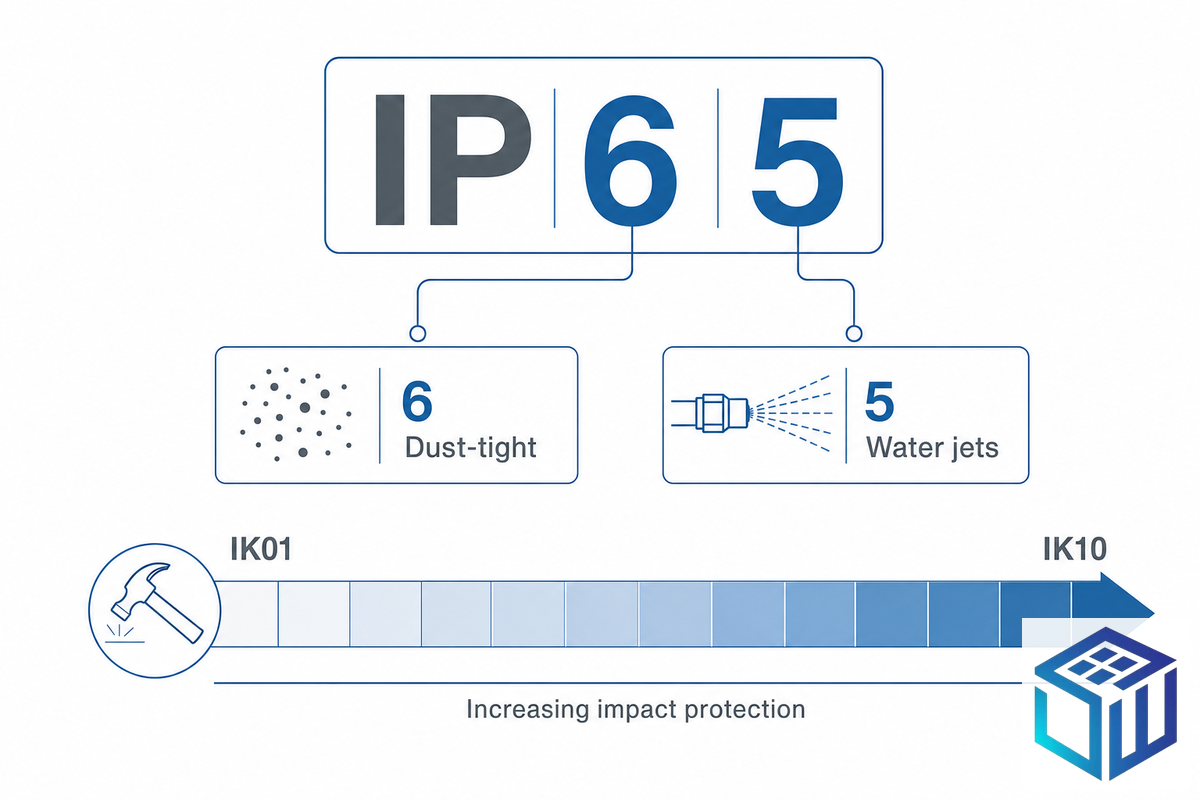
Sealing is where vague datasheets do the most damage, because two letters and two digits carry precise, testable meaning, and most touch-monitor guides never cite the standard behind them. Ingress protection — how well the enclosure keeps out water and dust — is defined by IEC 60529 (current consolidated Edition 2.2, 2013-08), and impact protection by IEC 62262. Read them digit by digit.
| Code | 1st digit (solids/dust) | 2nd digit (liquids) |
|---|---|---|
| IP54 | 5 = dust-protected | 4 = splashing water |
| IP65 | 6 = dust-tight | 5 = low-pressure jets |
| IP66 | 6 = dust-tight | 6 = powerful jets |
| IP69K | 6 = dust-tight | 9K = close-range high-pressure, high-temperature washdown |
📐 Engineering Note — decode IP69K
Read it as two independent claims. The 6 means fully dust-tight (no ingress at all). The 9K means tested against close-range, high-pressure (around 80–100 bar) water jets at up to ~80°C, the steam-cleaning regime of food and pharma lines. A panel rated IP69K isn’t “better IP65”; it’s certified for a specific washdown that IP65 (ordinary low-pressure jets) isn’t. Spec IP69K only where high-pressure hot washdown actually happens.
Impact is the other half. IEC 62262 defines the IK code from IK01 (the lightest, a fraction of a joule) through IK07 (2 J), IK08 (5 J), to IK10 (20 J). A public kiosk or vehicle terminal that an IP rating never addresses may still need IK08–IK10 against deliberate or accidental impact, which loops straight back to the cover-glass strength in layer two.
⚠️ Common mistake: the “IP65 front-side only” trap
Many units advertise IP65 but seal only the front bezel, not the full enclosure — the rear and cable entries are unrated. In a washdown line that is a failure waiting to happen. Always request the full-enclosure IP test report, not the marketing logo, and confirm whether the rating is front-side or all-around.
Durability Beyond the Rating: Temperature, Vibration & Impact
Sealing keeps water and dust out; durability keeps the panel alive through temperature swings, vibration, and shock. Commercial displays are typically rated 0–40°C, while industrial units span roughly −20 to +70°C, and the gap matters because a panel parked near a furnace or on a refrigerated dock will see the extremes daily. Wide-temperature operation usually means panel derating, and sometimes integrated heaters for cold starts.
Vibration and shock are tested under IEC 60068 (60068-2-6 for vibration and 60068-2-27 for shock), with MIL-STD-810 used for military and vehicle equipment. Impact resistance traces back to the cover glass: chemical strengthening yields roughly 4–5× the impact resistance of untreated glass, which is the practical reason a strengthened 1.1 mm panel survives drops that shatter ordinary glass.
One factor that buyer guides almost always miss: EMI and electrical noise. PCAP sensors read tiny capacitance changes, so motor drives, welders, and switching supplies can inject false touches unless the panel has proper shielding and noise-immune controller firmware. In genuinely noisy electrical environments, resistive, which senses physical pressure, not a field, can be the more dependable choice. Treat EMI as a real selection signal, not an afterthought.
Mounting, Sizing & Display Integration
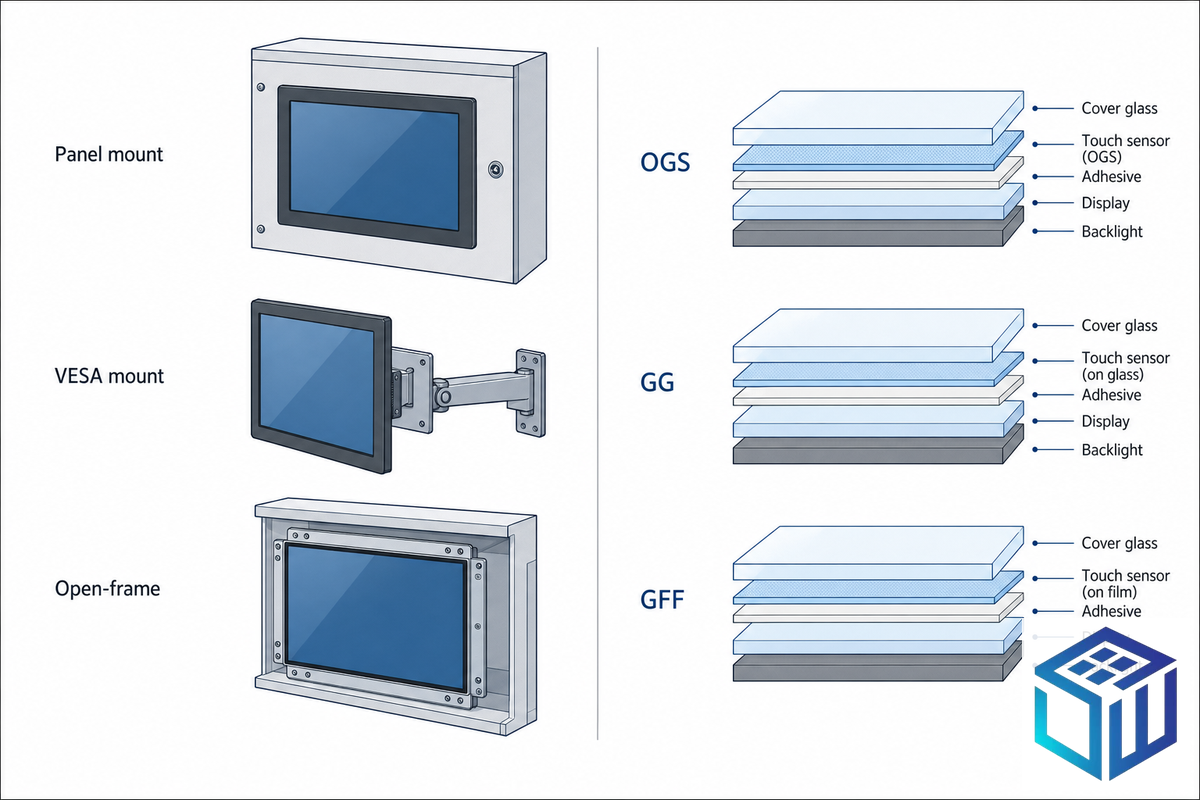
The last physical layer is how an industrial touch screen monitor, touch panel, or touchscreen display meets your enclosure and your controller. Industrial touch panels integrate the LCD touch with the sensor, and the panel technology used — from small touchscreen monitors to large LCD touch screens — sets your display options. Three choices recur: mount type, size, and the touch-sensor stackup.
- ✔ Mount: panel-mount (cutout, IP-sealed front) for cabinets; VESA for arms; open-frame for embedding into custom housings; use M12 or Hirose locking connectors, not bare USB/HDMI, in high-vibration sites.
- ✔ Size: industrial screens and display monitors run 5–10.1″ for compact HMIs, 12–15.6″ for controls and medical, 21″+ for kiosks; on these LCD monitors 1920×1080 is sufficient through 22″ — higher resolution rarely improves HMI legibility, and a hard glass screen surface matters more than pixel count.
- ✔ Sensor stackup runs from OGS (one-glass-solution, thin and economical) to GG (glass-glass, rugged) and GFF (glass-film-film); ITO-coated glass bonds to the controller via an FPC/ACF connection.
How do you select the right touchscreen size?
Size by viewing distance and interface complexity, not by what looks generous. A close-range single-operator HMI reads fine at 7–10″; a multi-operator control station or a dashboard viewed from across a cell needs 15″+. Confirm the cutout dimension, not the nominal diagonal, a “15-inch” bezel varies by model and can foul a tight panel. For module-level integration, our industrial touch display modules pair the glass, sensor, and bonding as one part.
Matching Specs to Your Application: The Industry-to-Spec Selection Matrix
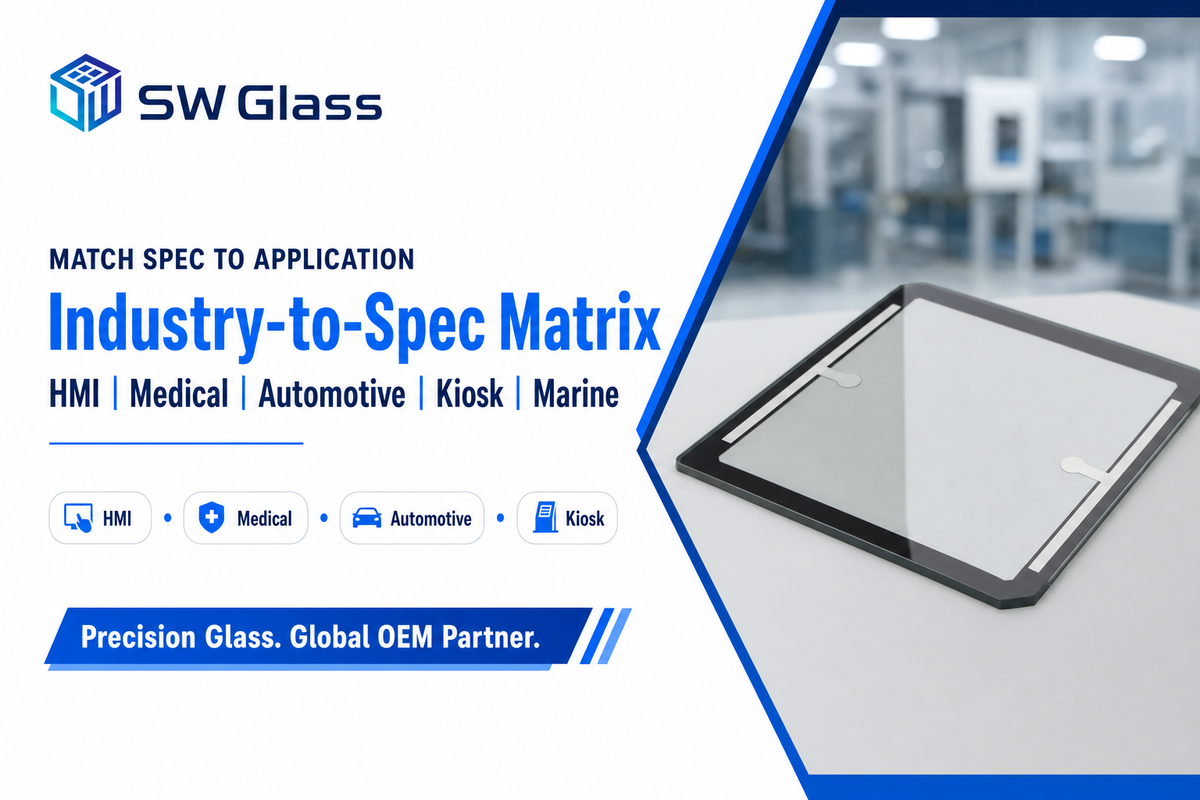
These six layers resolve differently by industry. Use the Industry-to-Spec Selection Matrix below as a starting point, then adjust for your exact environment, it’s a decision aid, not a substitute for confirming specs against your site.
| Application type | Touch | Glass + sealing | Coating |
|---|---|---|---|
| Industrial / HMI | PCAP (resistive if heavy-glove) | Aluminosilicate 1.1 mm, IP65 front | AG |
| Medical | PCAP | Strengthened, IP65, ISO 10993 | AF + AG |
| Automotive | PCAP | Strengthened/curved, wide-temp, vibration | AG (HUD) |
| POS / Kiosk | PCAP | Up to ~3 mm vandal, IP54–65, IK08+ | AG |
| Outdoor / Marine | PCAP (resistive for heavy-glove) | Optical-bonded, IP66/69K | AR + AG, ≥1000 nits |
| Military / Aerospace | PCAP or resistive | Strengthened, MIL-STD-810, EMI-shielded | AR + AG |
| Logistics / Warehouse | PCAP (resistive for cold-store gloves) | Strengthened 1.1 mm, IP54–65 | AG |
| Energy / Utilities | PCAP or resistive | Strengthened, wide-temp −20 to +70°C, IP65 | AG + AR |
| Food / Pharma (washdown) | PCAP, water-reject firmware | Strengthened, full-enclosure IP69K, IK08 | AF + AG |
A scenario show how the matrix bites. A food-processing integrator near a high-pressure CIP (clean-in-place) station first specified a standard IP65 PCAP panel with 0.7 mm glass. Two problems surfaced: the IP65 rating was front-side only, so the rear seal failed the first hot washdown, and operators in heavy nitrile gloves got dropped touches. The corrected spec, full-enclosure IP69K, 1.1 mm chemically strengthened glass with AF coating, and glove-tuned firmware, held up because each layer was chosen against the actual environment. Sector pages such as industrial HMI cover glass map these combinations in more detail.
Sourcing: MOQ, Lead Time, Customization & QC Documents
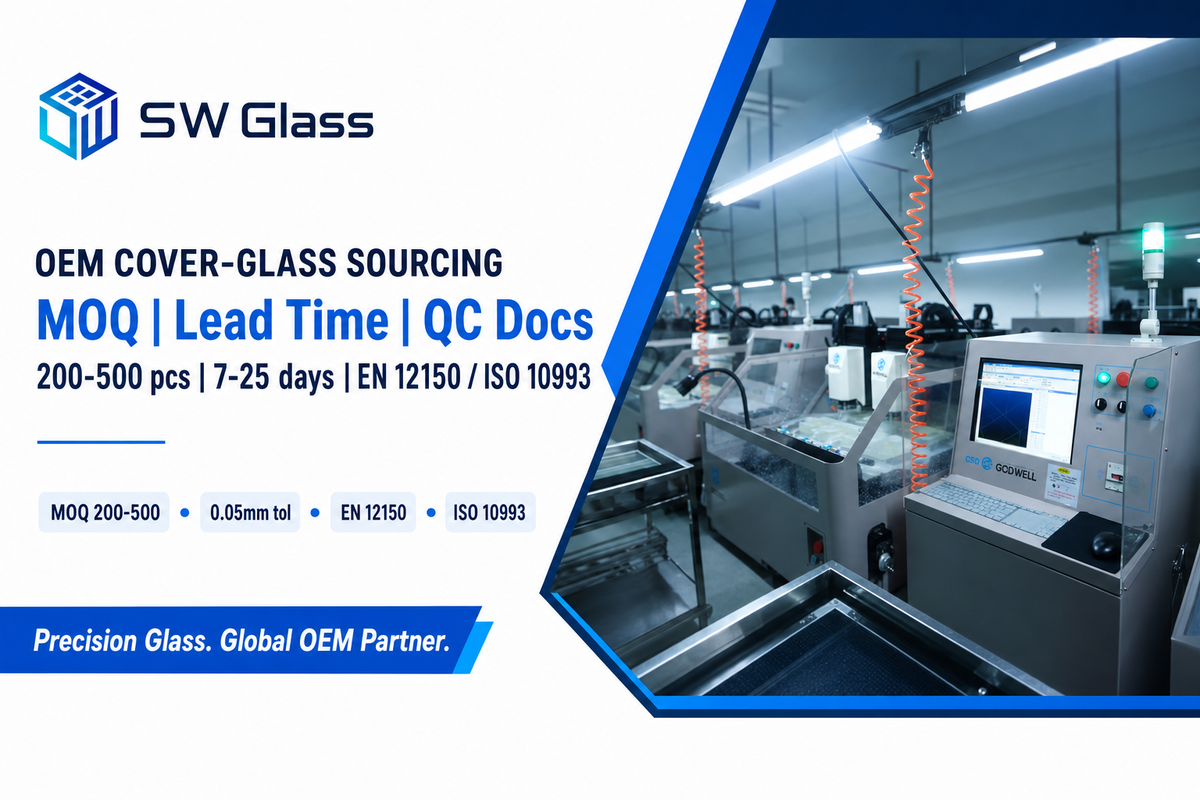
Once the spec is set, sourcing the cover glass is its own decision. What separates a full-capability fabricator from a glass trader show up in tolerance, traceability, and paperwork, the things that decide whether your end-customer’s quality audit passes.
- ✔ MOQ & prototyping: expect a 200–500-piece minimum; we run 50-piece prototypes at no charge on the same line as production, so samples measure what you’ll actually receive.
- ✔ Lead time: roughly 7–10 days for samples after engineering approval, 15–25 days for mass production, with CNC tolerance held to ±0.05 mm.
- ✔ QC documents to demand: EN 12150 fragment-test certificate for tempered glass, SGS RoHS/REACH reports, ISO 10993 biocompatibility for medical, plus lot-level traceability from raw glass through every treatment step.
- ✔ In-house vs trader: a single supplier running CNC, strengthening, AG/AR/AF coating, ITO, and screen printing under one quality system can trace a defect to its step in hours, not chase three subcontractors for weeks.
Selecting industrial touchscreen monitors and a customized touchscreen for industrial equipment comes down to the same logic. To choose the right custom touch solution, send your environment (indoor/outdoor, touch model, lighting, washdown, glove type) rather than a finished part number, and the right glass, thickness, strengthening, and coating stack follows from the conditions. Because industrial touch screen displays are used across so many industrial uses, Saiwei Glass focuses on the cover-glass layer; see the touch screen glass line for standard and custom options.
Industry Outlook: Where Industrial Touch Is Heading
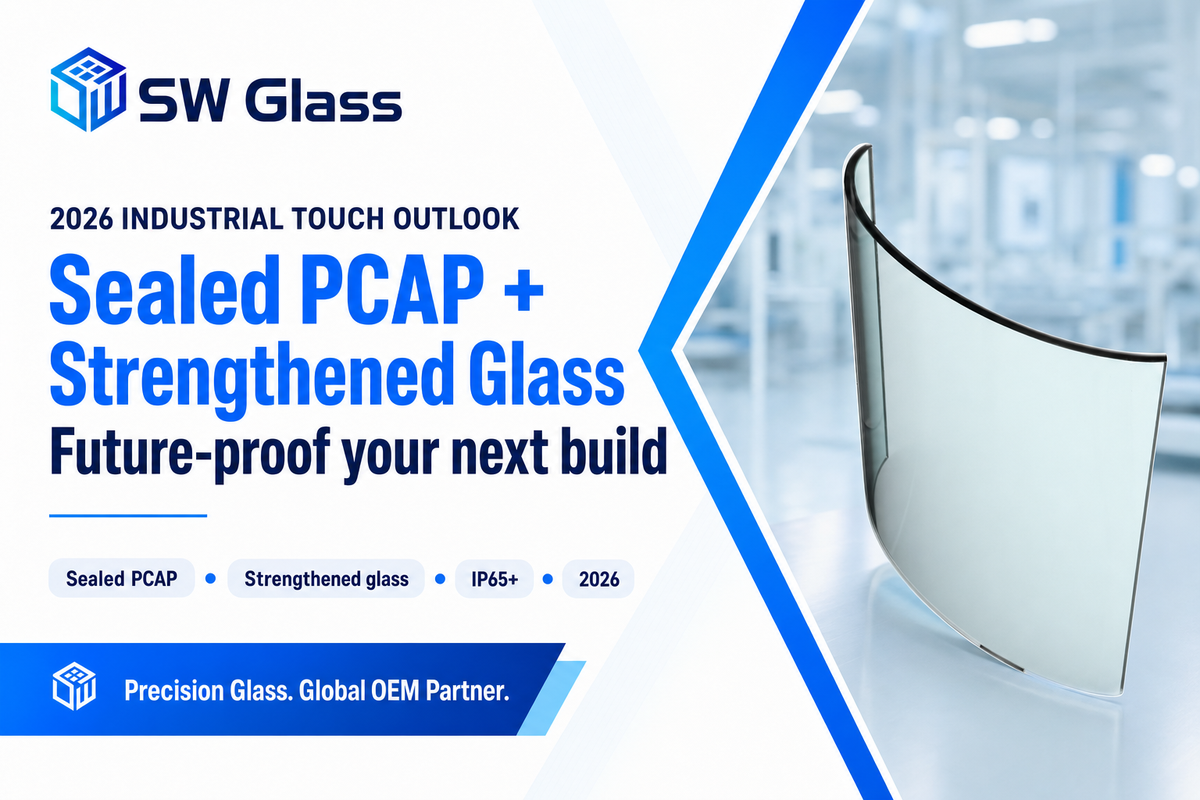
As touchscreen technology matures, the decisive shift for 2026 sourcing is that new industrial designs are consolidating on sealed, glove-operable projected-capacitive panels over chemically strengthened thin glass, while resistive is retained for specific niches rather than retired. Those drivers are concrete: washdown and hygiene rules pushing IP69K into food and pharma, multi-touch expectations migrating from consumer devices, and glass strengthening that lets a thin cover glass be both sealed and tough. For a new build, the future-proof default is PCAP plus at least IP65 plus aluminosilicate cover glass; keep resistive in the toolbox for fluid-exposed, cold-glove, single-touch jobs. There is a real sourcing risk in ignoring this: a plant that standardizes on a panel built around a soon-to-be-discontinued touch controller can face a full redesign and re-certification when that part reaches end-of-life, so for a ten-year program the PCAP-plus-strengthened-glass baseline is the safer bet against a costly forced re-spec.
For market context only, the touch-screen-module market is projected to grow from roughly $35 billion in 2026 toward $46 billion by 2035, and, tellingly, the resistive segment is still growing at around 9% annually rather than collapsing. Read that as confirmation that the change is a shift in design share, not the death of resistive. Spec for the next decade by choosing the technology the environment demand, and by treating the cover glass as a deliberate engineering choice rather than a default.
Specifying cover glass for an industrial touch screen?
Share with us your environment and touch model and our engineers can specify glass type, thickness, tempering and AG/AR/AF stack – with a 50-piece prototype prior to you moving to volume.
Frequently Asked Questions
Q: What touch screen technology is best for industrial applications?
View Answer
Projected capacitive (PCAP) is the default for most industrial HMIs because it supports multi-touch, lives behind a durable sealed glass surface, and lasts roughly 50 million-plus touches without recalibration. Resistive is the better choice where operators wear heavy gloves, the screen sees fluids, a stylus is required, or the budget is tight and single-touch is acceptable. The environment and interaction model decide, so many plants run both; for new designs, PCAP is increasingly the default.
Q: Can industrial touch screens be used with gloves?
View Answer
Resistive is glove agnostic as it is a pressure sensor. PCAP is compatible with thin/disposable gloves in glove mode (when glove mode firmware is enabled in the controller), however it often still does not work in glove mode with thick, insulated or dirty gloves. If the glove is cumbersome and the environment is moist, Resistive should be used.
Q: What IP rating does an industrial touch screen need?
View Answer
IP54 suffices for clean indoor control rooms. Most factory floors with dust or occasional washdown want IP65 (dust-tight plus low-pressure jets). High-pressure hot washdown lines, common in food and pharma, need IP69K. Whatever the target, demand the full-enclosure IEC 60529 test report, because many panels are sealed on the front bezel only.
Q: Is optical bonding worth it for industrial displays?
View Answer
For sunlit, outdoor, or vehicle displays, yes — bonding removes the air gap, sharply cutting reflection and condensation while raising impact strength. For climate-controlled indoor panels, an air gap with AG glass is usually enough and costs less.
Q: How thick should the cover glass be?
View Answer
For PCAP, 0.55–1.1 mm suits handhelds and HMIs, and 2–3 mm suits rugged or kiosk use. Past about 3 mm a standard mutual-capacitance sensor loses touch sensitivity, so retune the firmware or change sensor type rather than just adding glass.
Q: How do I choose the right screen size and brightness?
View Answer
Size to viewing distance and interface complexity: 7–10.1″ for single-operator HMIs, 12–15.6″ for control stations and medical imaging, and 21″+ for distant kiosks. Measure the cutout dimension, not the diagonal. Plan brightness at 250–400 nits indoors, 500–800 nits in bright interior light, and 1000+ nits in direct sun with AR and optical bonding. Don’t over-spec, since a bigger or brighter panel than the task needs just adds heat, cost, and power.
Q: What’s the MOQ for custom touch screen glass?
View Answer
Standard minimum is 200–500 pieces, though 50-piece prototypes are usually available for design validation and approval before a production run. Samples ship in about 7–10 business days and mass production in 15–25 days, depending on the coating complexity and the glass material specified.
About This Analysis
This guide approaches industrial touch screen selection from the cover-glass layer outward, because the glass material, thickness, strengthening, and coating decide more about field reliability than the housing. The glass specifications cited (CS>450 MPa, DOL>8 µm, AG/AR/AF values, ±0.05 mm tolerance) are Saiwei Glass production data; standards and material figures are drawn from IEC, the American Ceramic Society, and university glass-science sources listed below. Reviewed by the Dongguan Saiwei Glass Co., Ltd. technical team.
References & Sources
- Ingress Protection (IP) ratings, IEC 60529International Electrotechnical Commission
- Degrees of Protection Provided by Enclosures (IP Code)Pacific Northwest National Laboratory (U.S. DOE)
- Prospects for Ion-Exchange Processing of Commercial Soda-Lime-Silica GlassesAmerican Ceramic Society Bulletin (LaCourse et al., Alfred University)
- Glass Strengthening (3.071 Amorphous Materials)MIT OpenCourseWare
- Measurement of Stress Build-up of Ion-Exchange Strengthened GlassPMC, U.S. National Institutes of Health
- Accelerated High-Case-Depth Chemical Strengthening of GlassLehigh University International Materials Institute
- IK Code (IEC / EN 62262) Impact Protection Ratingsreference summary