Get in Touch with Saiweiglass




A glove compatible touch screen is an industrial touch screen engineered, through its touch technology, cover glass, and controller firmware, so an operator can run it without removing gloves. The consumer market solves this by changing the glove (conductive thread, special coatings). On a factory line, cold store, or washdown station, you can’t dictate what gloves people wear, so the fix has to live in the screen. This guide cover the three levers that decide glove compatibility, how to read a spec sheet, and how to match a panel to your gloves and environment.
Quick Specs, Glove Compatibility at a Glance
| Touch technology | PCAP with glove mode / 4–5-wire resistive / infrared (IR) |
| Cover glass | 0.55–2.0mm typical; thinner glass = more glove signal headroom |
| Firmware features | Glove mode (raised sensitivity), water rejection, palm rejection |
| Glove range | Thin nitrile → heavy insulated; dry / wet / contaminated all behave differently |
| Sealing | IP65 → IP69K for wet and washdown areas (IEC 60529) |
| Activation principle | PCAP = capacitive coupling (needs tuning); resistive = pressure (any glove) |
What “Glove-Compatible” Actually Means for a Touch Screen
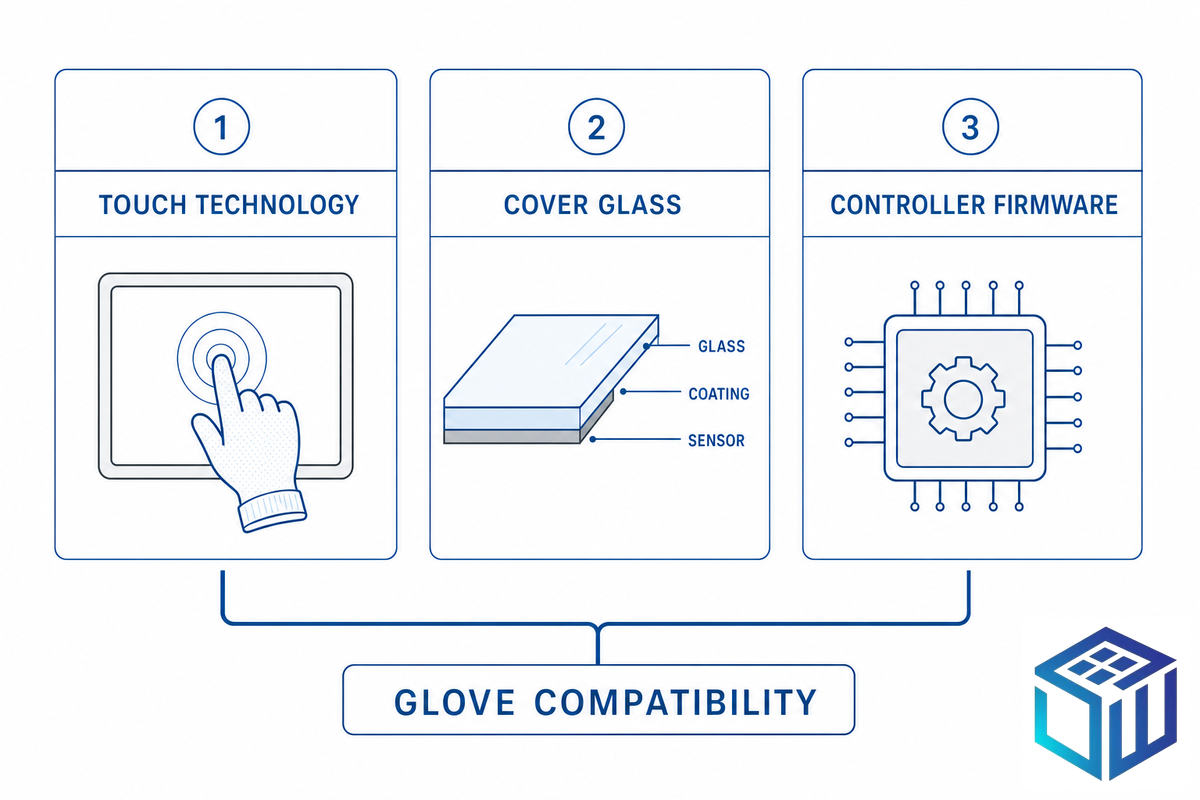
There are two opposite ways to make a touchscreen work with gloves. The consumer route fixes the glove: conductive fingertips, knit silver thread, or an after-market liquid that adds conductivity. The industrial route fixes the screen, because an OEM building a control panel has no control over which gloves the end operator will pull on next winter, or whether they’ll be greasy by lunchtime.
A glove-compatible touch screen is therefore defined by three engineering levers, not by a single feature checkbox:
- 1.Touch technology: whether the panel senses capacitance (PCAP), pressure (resistive), or a beam grid (IR).
- 2.Cover glass: the material and, critically, the thickness, which sits between the finger and the sensor.
- 3.Controller firmware: the tuning that raises sensitivity for a glove while rejecting water and palms.
Get those three right together and a screen read a gloved hand reliably. Get one wrong, say, a thick cover glass paired with a thick glove, and the panel feel dead even though every datasheet said “glove mode supported.”
Why Gloves Stop a Capacitive Touch Screen
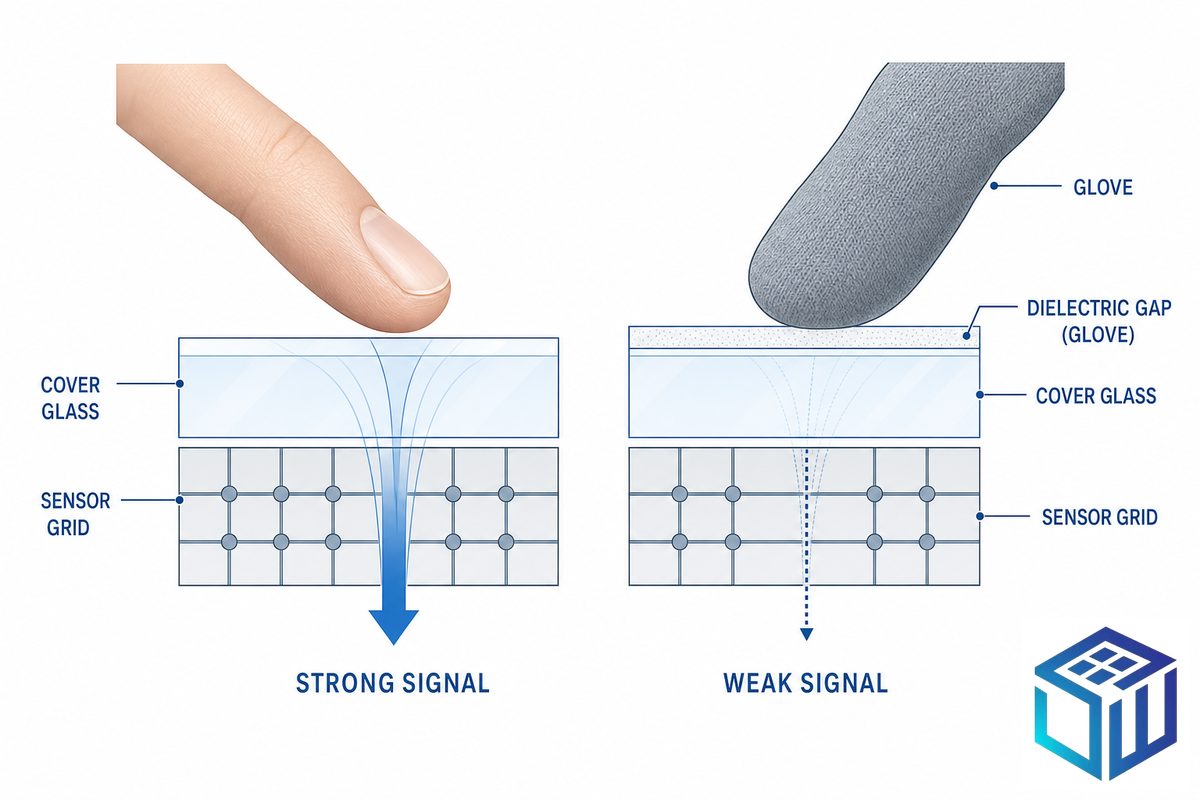
Gloves stop a capacitive touch screen because they insert a layer of non-conductive material between finger and sensor, increasing the dielectric distance the field must reach across. A projected-capacitive (PCAP) sensor reads the small capacitance change a bare, conductive finger makes through the cover glass; add a glove and that signal fall, and below the controller’s detection threshold the touch no longer registers. The thicker, drier, and more insulating the glove, the worse it get.
This is the single rule that explains almost every field complaint, and it’s worth naming. Call it the Glove Dielectric Gap Rule: the capacitive signal a screen sees drops as the glove gets thicker, drier, and more insulating, because each of those increase the dielectric distance between the conductive finger and the sensor. As one capacitive-sensing reference put it, capacitive sensing only detects what’s conductive and close; a standard glove block much of that coupling. A thick screen protector adds to the very same dielectric stack, which is why a bare finger or thumb often works where a gloved index finger or fingertip won’t.
Three practical consequences follow:
⚠️ What actually breaks gloved touch in the field
It’s rarely “gloves” in the abstract. It’s thickness (a 0.1mm nitrile glove behaves nearly like a bare finger; a heavy insulated cold-store mitt doesn’t), dryness (dry leather is one of the worst cases), and contamination. Practitioners maintaining plant HMIs report that operators “use dirty gloves, which cause issues” long before glove thickness alone would. Oil, dust, and dried product all change the surface the sensor is trying to read.
Because the problem is conductivity and distance, the fix is also physical: shorten the distance (thinner glass), raise the gain (firmware), or change the sensing principle entirely (resistive). The rest of this guide is those three moves.
Glove Mode & Firmware: How PCAP Is Made Glove-Operable
Can industrial PCAP touch screens be used with gloves? Yes, a correctly tuned PCAP panel reads thin-to-medium gloves reliably, and trade coverage of new HMI hardware notes that modern projected-capacitive screens stay “highly responsive even when wearing gloves and less sensitive to debris and moisture.” The enabling feature is glove mode, and it’s firmware, not magic.
The pain this solves is concrete. On a meat or dairy packaging line, operators pull on nitrile or chain-mail gloves for a wet step and strip them off for fine adjustments many times a shift. A panel without glove mode forces a glove-off tap on every cycle, dozens of interruptions per hour, each one a chance to contaminate product or lose a few seconds of throughput. Glove mode is what removes that toll, which is why it belongs on the requirements list, not the wish list.
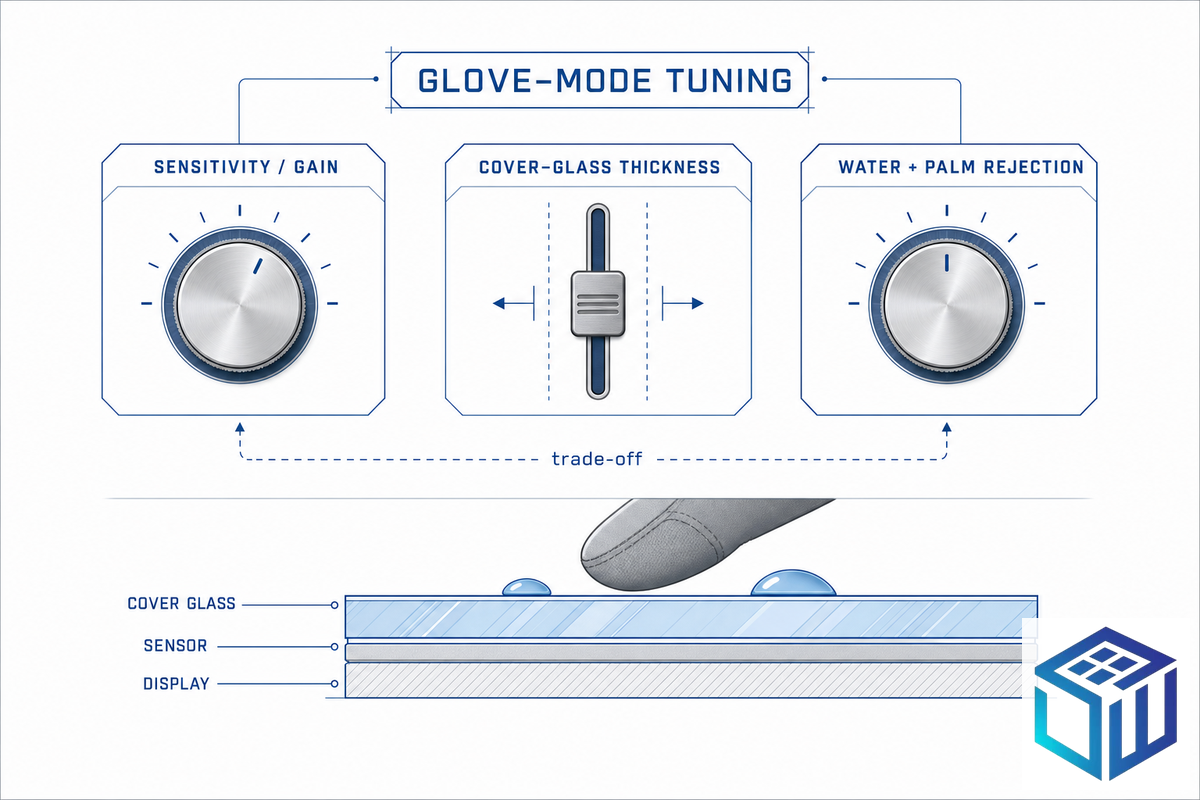
Glove mode raises the controller’s sensitivity threshold so a weaker (gloved) signal still counts as a touch. That single change has side effects, which is why a good panel exposes a coordinated set of controls. Think of it as a coordinated model with three levers:
The 3 Levers That Tune a Touch Screen for Gloves
- 📐Sensitivity / gain: the lever that let a gloved touch cross the detection threshold.
- 📐Cover-glass thickness: a hardware lever set at design time; thinner glass spends less of the signal budget (next section).
- 📐Rejection filters: water rejection and palm rejection that keep the raised sensitivity from triggering on droplets or a resting hand.
The lever interaction matters. A touch-controller manual for one industrial PCAP kit notes that under its high-sensitivity glove-operation mode, water-rejection performance is reduced, the same gain that helps a glove also help a water film register as a false touch. That’s the central trade-off of glove mode, and it’s why glove operation has to be specified, not switched on after the fact: a panel built for gloves needs the controller, the firmware profile, and (often) a hydrophobic coating chosen together. Field guidance from controller and panel makers is consistent on this, define the glove type and thickness early, then validate touch-target size and spacing against it. The sensor-side engineering that makes gloved detection possible, higher-gain scanning and interpolated touch arrays that resolve a weaker signal, is documented in capacitive-touch-sensor patents such as US9459746B2; for the buyer, the point is that glove operation is a designed capability to validate, not a setting to hope for.
Touch Technology for Gloves: PCAP vs Resistive vs IR
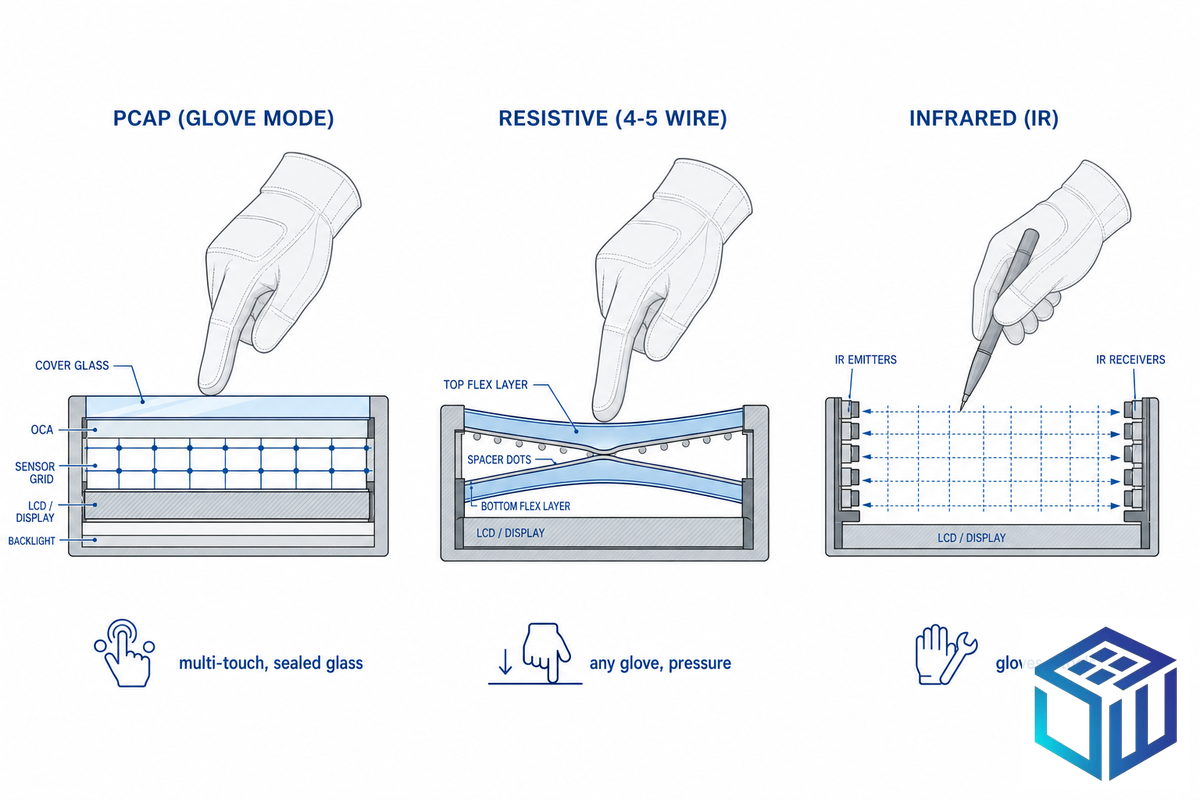
The popular framing — “PCAP can’t do gloves” or, inversely, “resistive is obsolete” — is wrong in both directions. Tuned PCAP handles most gloves; resistive still wins outright for heavy, dirty, or wet single-touch work, which is why the resistive touchscreen market is still growing rather than disappearing. Match the technology to the glove and the task, not to fashion. In a cold-storage receiving dock, for instance, workers in chain-mail-lined freezer gloves get nothing from even a glove-mode PCAP panel, while the same gloves drive a 4-5-wire resistive screen without complaint; two aisles over, a QA bench running thin nitrile and wanting pinch-zoom makes PCAP the obvious pick. Same building, two different right answers. The sensor engineering that lets a tuned projected-capacitive panel read a glove at all is documented in capacitive-touch-sensor patents such as US9459746B2.
| Dimension | PCAP (glove mode) | Resistive (4–5 wire) | Infrared (IR) |
|---|---|---|---|
| Glove range | Thin to medium; heavy/dry leather marginal | Any glove, incl. heavy/insulated/dirty | Any glove or tool (beam break) |
| Wet performance | Good with water rejection; tuning trade-off | Works wet (pressure-based) | Degrades with surface contamination |
| Multi-touch | Yes (gestures) | Single-touch (typical) | Yes |
| Durability / clarity | Sealed glass surface, high clarity | Film wears; lower clarity | No overlay; high clarity, dust-sensitive |
| Best fit | Mixed-glove HMI, hygiene, multi-touch UX | Heavy-glove, single-touch, budget, fluid | Large-format indoor panels |
“Capacitive screens are not always the best option, and resistive screens are not necessarily outdated. The environment where you use your touchscreen, and specifically the worst glove it will ever see, decides the call.”
Industrial touch-panel field guidance
Cover-Glass Thickness vs Touch Sensitivity
A common field failure looks like this: an engineer adds a thicker vandal-resistant cover glass late in a design to pass a drop test, ships it, and then the floor reports that gloved touches no longer register. The cover glass is almost always why.
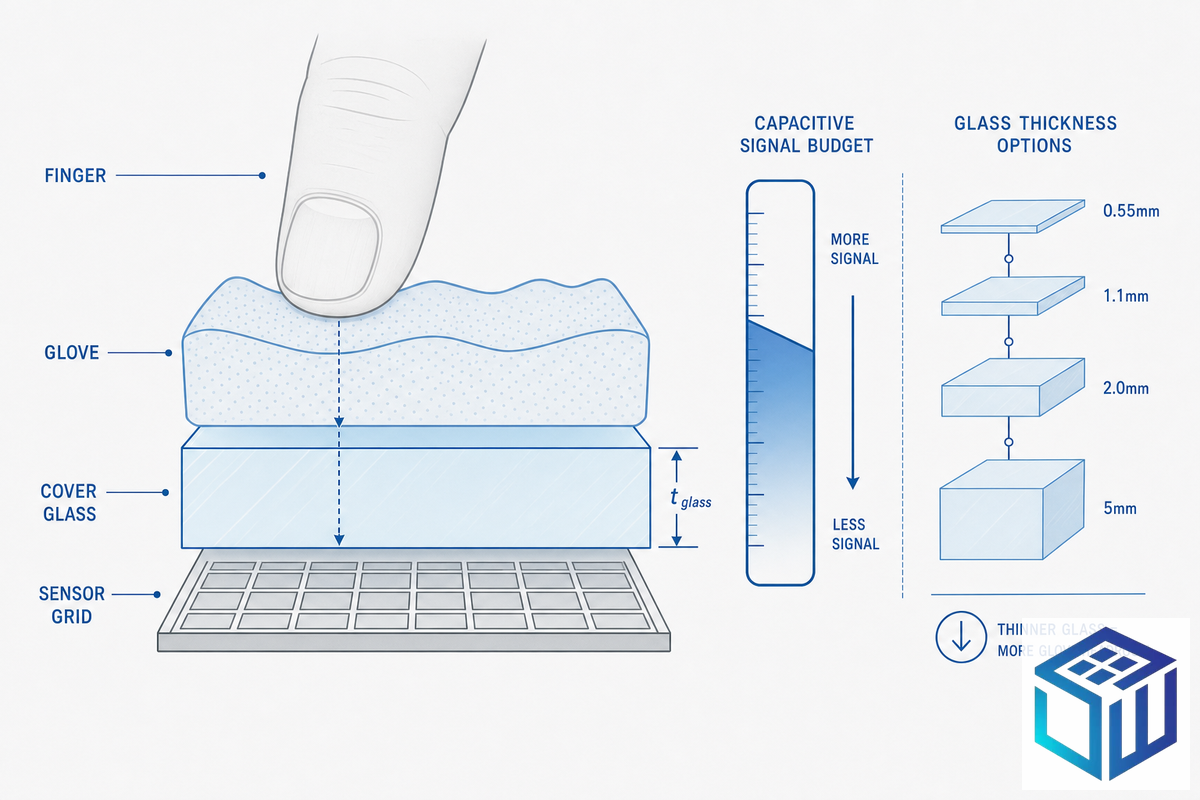
How does cover-glass thickness affect glove touch? The cover glass is dielectric, exactly like a glove. Every millimetre of glass between finger and sensor spends part of the same capacitive signal budget that a glove also draws from. A thick glove behind thick glass stacks two dielectric layers, and the controller can run out of headroom even with glove mode on. A 2mm cover glass with a 1mm coated work glove asks the sensor to read through 3mm of combined dielectric, near the practical ceiling for reliable gloved touch.
This is the lever most monitor selection guides skip, and it’s where the glass choice decides whether glove mode will work at all:
| Cover glass thickness | Typical use | Glove headroom |
|---|---|---|
| 0.55–0.7mm | Wearables, handhelds, thin HMI | Highest — best for thick gloves |
| 1.1mm | Standard industrial HMI | Good with glove mode |
| 2.0–3.0mm | Ruggedized / kiosk / vandal | Tunable, but thin gloves only |
| 5mm+ | Thick protective lens | Specialist tuning; little glove margin |
Panel vendors confirm the ceiling: standard PCAP runs over roughly 1.1mm glass, and controllers can be tuned to detect touch through cover lenses up to about 5–10mm, the very same controller features that read thick gloves are what allow thick glass. The design rule is to spend the budget where it counts: for gloved use, favour thinner glass and put the saved headroom into the glove.
📐 Engineering Note — why thin gloved panels use chemically strengthened glass
Thinner glass is mechanically weaker unless it’s strengthened, and thermal tempering becomes ineffective below about 3mm. So thin cover glass for gloved HMIs is chemically strengthened by potassium-for-sodium ion exchange, a process documented in patents such as US8312739B2 (dual-stage ion exchange). Our production aluminosilicate cover glass holds compressive stress >450 MPa with depth of layer >8µm at thicknesses from 0.4–3.9mm, cut to ±0.05mm, thin enough to preserve glove signal, strong enough to survive a dropped tool.
Glove Types and What They Do to Touch
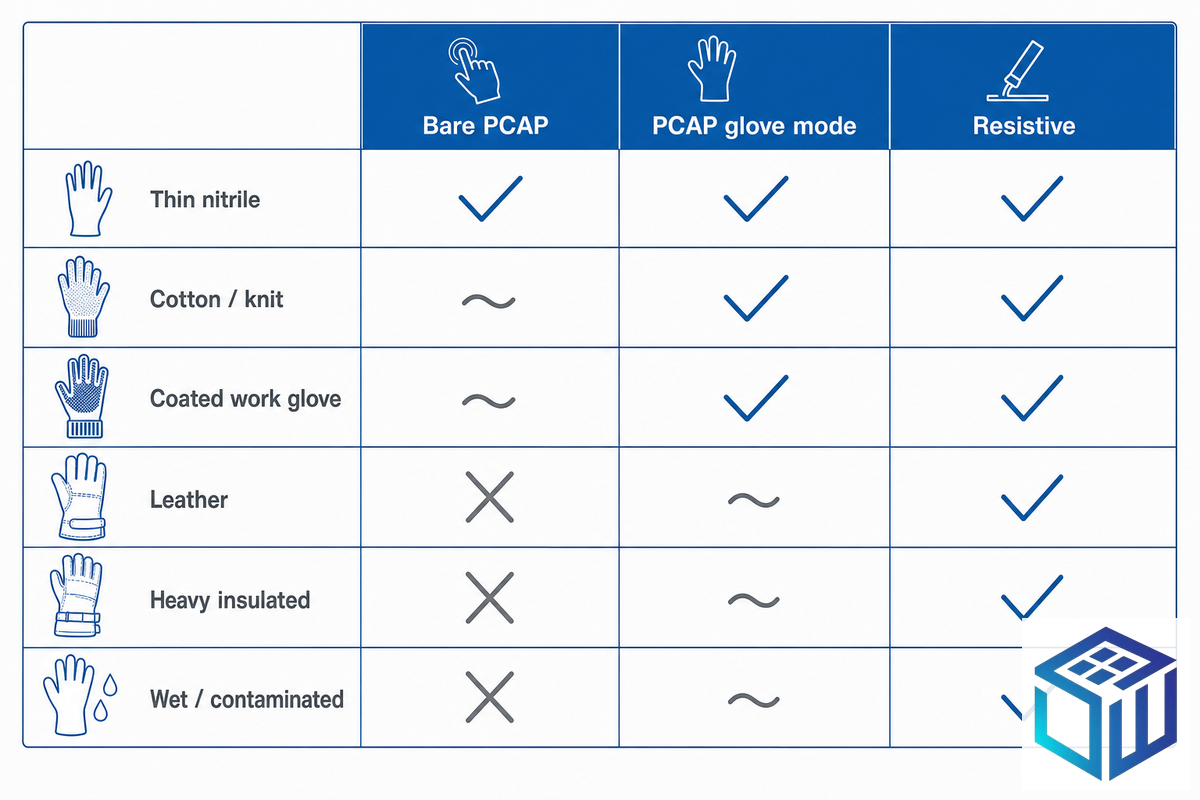
Will my gloves work? That depends less on the word “glove” than on the specific material, thickness, and condition. Across the common types of gloves, from thin nitrile to coated tactical gloves and heavy cold-weather mitts, the touch behaviour shifts with each. The Glove-to-Touch Compatibility Matrix below maps the common industrial gloves against each touch technology, so you can read off the likely behaviour for the glove your operators actually wear.
| Glove type | Bare PCAP | PCAP glove mode | Resistive |
|---|---|---|---|
| Thin nitrile / latex (≤0.2mm) | Usually works | Works | Works |
| Cotton / knit | Marginal | Works | Works |
| Coated work glove | No | Usually works | Works |
| Dry leather | No | Marginal | Works |
| Heavy insulated / cold-store | No | Often no | Works |
| Thick disposable nitrile (0.3mm+) | Marginal | Works | Works |
| Damp / oiled leather | No | Marginal | Works |
| Chain-mail / cut-resistant | No | No | Works |
| Thick rubber / chemical | No | Often no | Works |
| Wet or contaminated | False touches | Needs water rejection | Works |
Two non-obvious points fall out of the matrix. Wet doesn’t simply “fail” on PCAP, a water film is conductive, so it can over-trigger and create false touches, which is a firmware problem (water rejection), not a sensitivity problem. And the worst capacitive case is a thick, dry, insulating glove: maximum dielectric, minimum coupling. When that’s the daily reality, cold storage, heavy fabrication, resistive or a thin-glass glove-mode panel is the honest answer. Glove conductivity can itself be engineered, the conductive-fabric glove in patent US9051621B2 is one example, but on an industrial line you can’t rely on every operator wearing a special glove, which is exactly why the durable fix live in the screen.
Wet, Dirty & Gloved: Water Rejection and IP Sealing
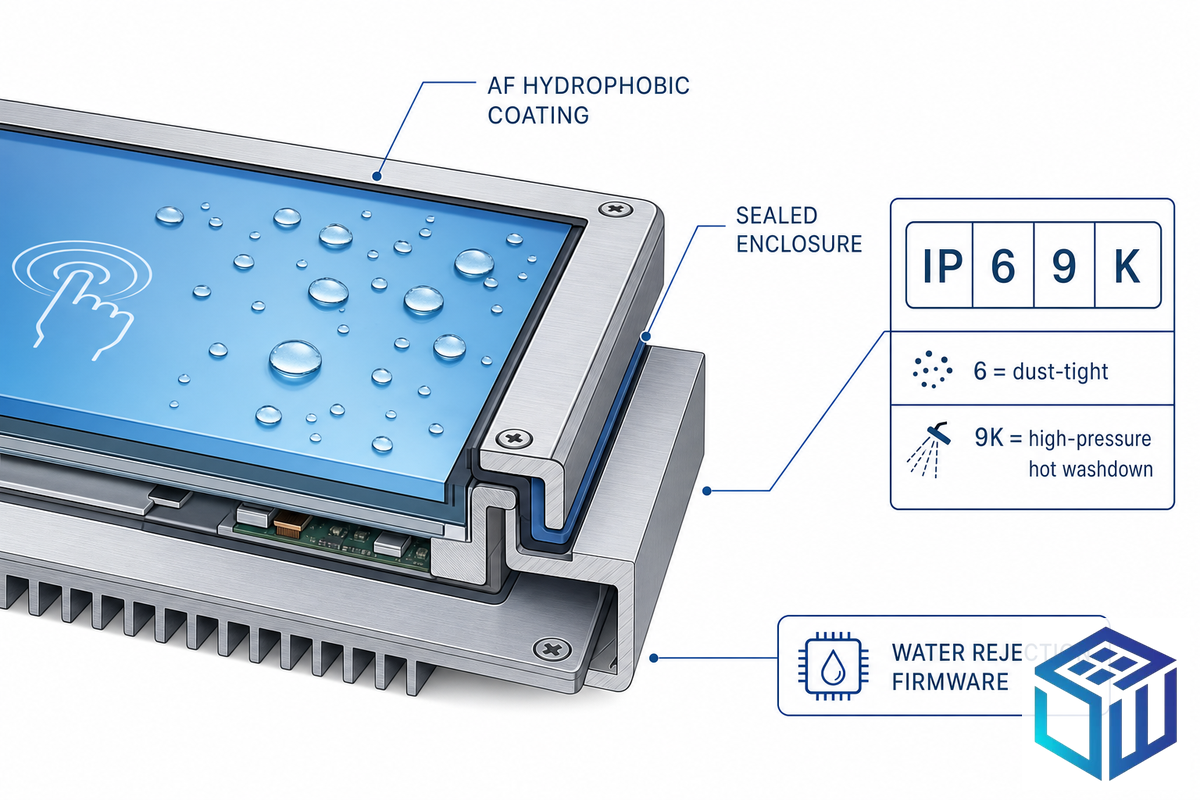
Gloved hands rarely arrive clean and dry. Food and pharmaceutical lines run high-pressure washdowns; outdoor and marine panels see rain and spray. Two separate systems have to hold for gloved-wet operation, and it helps to spec them as one Wet-Glove Survival Stack: the firmware that ignores water, plus the enclosure rating that keeps water out.
- ✔Water rejection firmware: distinguishes a gloved fingertip from a droplet or film so the screen doesn’t fire on water.
- ✔Anti-fingerprint (AF) surface: a hydrophobic, easy-clean top coat so water beads and wipes off. Our AF coating holds a water contact angle of 105°±5°.
- ✔Ingress sealingIP65 to IP69K per the enclosure rating, sized to the cleaning regime.
Read the sealing rating literally, because the digits are defined precisely. Under IEC 60529, the first digit is dust (6 = dust-tight) and the second is water: 5 is a 6.3mm water jet, 6 is a 12.5mm powerful jet, and IP69K is close-range, high-pressure washdown at roughly 80°C and 80–100 bar, the rating food and pharma washdown lines need. Mechanical impact is a separate code: IEC 62262 (IK code, amended 2021) runs IK00 to IK10 (about 20 joules at the top).
⚠️ The IP65 front-face trap
A panel advertised as IP65 is often rated on the front bezel only. Mounted into a cabinet, the back and gasket line still need sealing or dust and washdown water get in from behind. Ask for the full-enclosure test report, not just the front-face number.
Specifying a Glove-Compatible Touch Panel by Application

The right glove-compatible spec is an output of your environment, not a universal “best.” This Application-to-Glove-Spec matrix reads off the touch technology, cover glass, and sealing that fit each sector’s real glove reality.
| Application | Typical glove | Recommended spec |
|---|---|---|
| Cold storage / logistics | Heavy insulated | Resistive, or PCAP glove mode on thin glass + heater |
| Food / pharma washdown | Wet nitrile | PCAP + water rejection + AF + IP69K |
| Medical / lab | Thin nitrile | PCAP glove mode + AF hygiene + chemically strengthened glass |
| Automotive / field service | Mixed | PCAP glove mode + AG/AR for sunlight |
| Heavy industry / oil & gas | Thick, dirty, leather | Resistive (single-touch) for the dirtiest stations |
The pattern across sectors is documented even in safety and human-factors work: where the job require the hands to stay gloved, the interface has to be designed for it rather than expecting operators to bare a finger. NASA’s Glove-Enabled Computer Operations work and NIST’s Public Safety user-interface roadmap both treat gloved operation as a design constraint, not an edge case. For most of these sectors the right home is an industrial HMI cover glass built around the gloves in use; medical device glass and rugged outdoor display glass carry their own coating and sealing needs.
Sourcing Glove-Ready Cover Glass & Touch Modules
Glove compatibility lives in the spec sheet, so the sourcing conversation should force it onto paper. A panel that says “glove mode supported” with no tested glove is a promise, not a specification. Buyers who skip the glove acceptance test are the ones who discover, after the first production batch lands, that the panel their datasheet called “glove compatible” was validated with a thin nitrile sample and not the leather rigger gloves their crews actually wear, a mismatch that surfaces on the floor, not in the lab.
- ✔State the glove mode setting and the exact glove type and thickness it was tested with.
- ✔Specify cover-glass material and thickness, plus AF coating if the area is wet.
- ✔Confirm IP / IK ratings on the full enclosure, with the test report.
- ✔Request a glove acceptance test with your own glove before committing to volume.
As a cover-glass manufacturer, we process touch screen glass and custom cover glass in-house, CNC cutting to ±0.05mm, chemical strengthening, AG/AR/AF coating, and optical bonding under one ISO 9001 system. Typical terms are a 200–500 piece minimum order, a 50-piece prototype run, samples in 7–10 days and volume in 15–25 days, with EN 12150 fragment-test, SGS RoHS/REACH, and ISO 10993 documentation available. For the touch stack itself, pair the glass with the right touch display module.
What’s Changing: Glove-Operable Touch Goes Mainstream
Glove mode, water rejection, and palm rejection used to be premium extras; they’re now standard features on mainstream touch-controller ICs. That shifts the default for new industrial designs: sealed, glove-operable PCAP on thin chemically strengthened glass is becoming the baseline as multi-touch interfaces migrate from consumer devices and washdown rules push more lines toward IP69K.
Resistive isn’t being retired, it keeps its place for heavy-glove, dirty, single-touch stations, and its market is still growing, but it’s increasingly the deliberate exception rather than the default.
Specifying the wrong default is expensive. A resistive panel chosen for a line that later adds multi-touch, or a capacitive panel that can’t read the gloves the floor actually wear, both force a mid-program re-spec and re-qualification that can cost weeks of schedule and a fresh round of validation. For procurement, the practical move for 2026 and beyond is to spec PCAP with glove mode, a thin chemically strengthened AF cover glass, and at least IP65, then reserve resistive for the specific stations where the gloves are simply too heavy or too dirty for capacitive coupling. (Market-size figures for touch modules and touchscreen apparel are widely quoted but should be treated as background; the load-bearing driver here’s the firmware-and-sealing default, not the headline CAGR.)
Frequently Asked Questions
Q: Why don’t gloves work on a capacitive touch screen?
View Answer
A capacitive screen senses the change a conductive finger makes to its electric field through the cover glass. A glove adds non-conductive material between finger and sensor, increasing the dielectric distance, so the signal drops. The thicker, drier, and dirtier the glove, the weaker the signal — until it falls below the controller’s detection threshold and no touch registers.
Q: Can industrial touch screens be used with gloves?
View Answer
Yes. A PCAP panel tuned with glove mode reads thin-to-medium gloves reliably, and resistive panels accept any glove because they sense pressure rather than capacitance. The key is that glove operation is specified at design time — matching firmware, cover-glass thickness, and the actual glove — not switched on after the panel ships.
Q: What touch technology works best with gloves?
View Answer
For thin-to-medium gloves with multi-touch and a sealed surface, PCAP with glove mode is the strongest fit. For heavy, insulated, dry, or dirty gloves doing single-touch work, resistive is more reliable because it responds to pressure regardless of conductivity. Infrared suits large indoor panels but is sensitive to dust on the bezel.
Q: Do touch screens work with wet gloves?
View Answer
They can, but water is conductive and can cause false touches on a capacitive panel, so a wet-gloved screen needs water-rejection firmware plus a hydrophobic AF coating to shed the film. Resistive handles wet gloves natively because it senses pressure, not capacitance, which is one reason washdown lines still spec it for the dirtiest stations.
Q: How thick can the cover glass be for glove touch?
View Answer
Standard industrial PCAP runs over about 1.1mm of cover glass, and controllers can be tuned through roughly 5–10mm. But glass and glove share one signal budget, so for gloved use favour thinner (0.55–1.1mm) chemically strengthened glass to leave headroom for the glove.
Q: Are touchscreen-compatible gloves better than a glove-mode screen?
View Answer
For a consumer who controls their own gloves, conductive touchscreen gloves are a fine fix. For an industrial OEM, they are fragile and unenforceable: conductive thread wears out and washes out, and you cannot guarantee every operator wears the right pair. Building glove compatibility into the screen — firmware, cover glass, sealing — is the durable answer, because it works regardless of which glove shows up and can be specified and audited.
Q: What IP rating do I need for gloved washdown use?
View Answer
For high-pressure, high-temperature washdown in food or pharma, specify IP69K on the full enclosure. IP65 or IP66 suits routine spray and hose-down, and IP67 covers brief immersion. Always verify the rating covers the whole enclosure and its gasket line, not just the front face, and ask the supplier for the full test report.
Related Articles
Why We Wrote This
From the cover-glass side of the touch stack, our view is consistent: most “glove compatibility” problems trace back to glass thickness and firmware tuning, not to the glove alone. The cover-glass specifications cited here, CS >450 MPa, DOL >8µm, ±0.05mm CNC tolerance, AF contact angle 105° — are our own production figures for glove-ready touch panels. Reviewed by the Dongguan Saiwei Glass Co., Ltd. technical team.
References & Sources
- Ingress Protection (IP) ratings, IEC 60529International Electrotechnical Commission
- EN 62262:2002/A1:2021, IK Code for enclosure impact protectionCENELEC / IEC
- Glove-Enabled Computer Operations (GECO)NASA Technical Reports Server
- Public Safety User Interface R&D Roadmap (NIST TN 1961)National Institute of Standards and Technology
- US8312739B2, Dual-stage ion exchange for chemical strengthening of glassUSPTO via Google Patents
- US9051621B2, Material for use with a capacitive touch screen (conductive glove)USPTO via Google Patents
- Capacitive sensingtechnical reference overview