Get in Touch with Saiweiglass



Capacitive vs Resistive Touch Screen: Which Technology Fits Your Application?
Two market leading technologies dominate the touchscreen – and between resistive and capacitive you can no longer go for the newer technology. These two technologies solve different engineering problems -and making the wrong choice can lead to a early breakdown, with bad user experience and/or a expensive budget. In this article we break down the key differences with specifications you can measure so you finally know which touch screen technology to pick.
Quick Specs Comparison
| Parameter | Capacitive (PCAP) | Resistive (RTP) |
|---|---|---|
| Touch Detection | Electrostatic field change | Physical pressure (two layers contact) |
| Activation Force | None (finger proximity) | 50–100 g |
| Response Time | <10 ms | 15–25 ms |
| Multi-Touch | Up to 10+ points | Single touch only |
| Surface Hardness | 7H+ (glass, ASTM D3363) | 2H–3H (PET film) |
| Touch Lifespan | >200 million cycles | 1–5 million clicks |
| Light Transmittance | >90% | 70–85% |
| Unit Cost (10″) | $100–$300 | $60–$180 |
How Capacitive and Resistive Touch Screens Work
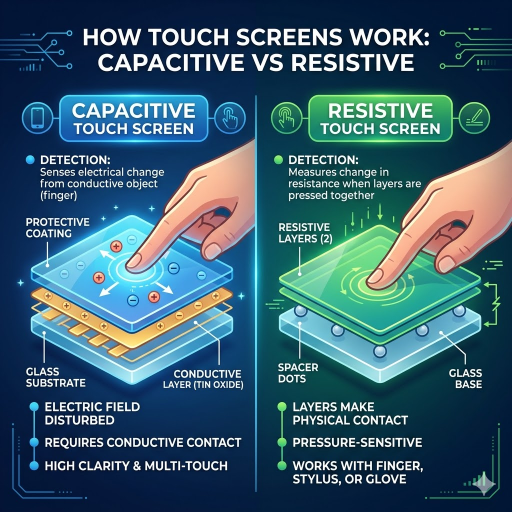
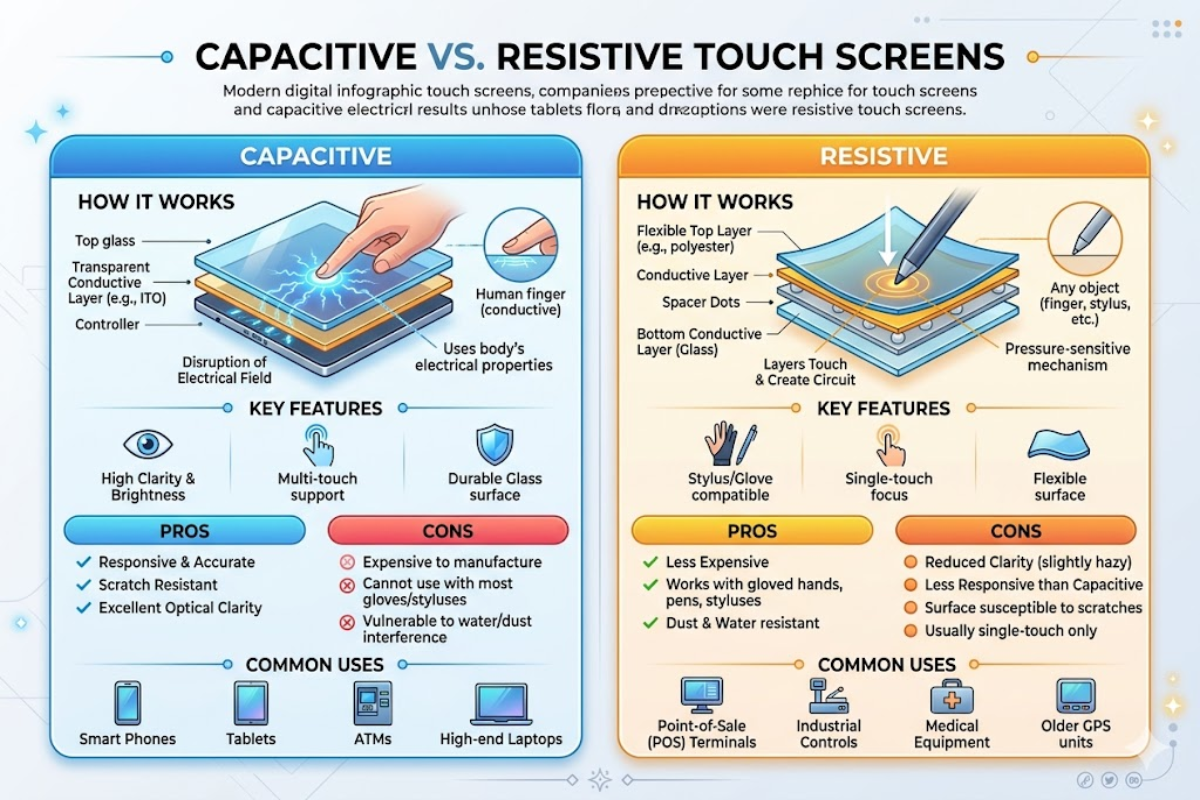
A capacitive touch screen is a touchscreen display based on an insulator (glass) coated with an electrically conductive transparent layer—which is commonly indium tin oxide (ITO).When your finger approaches the screen, it shorts out the electrical field that runs through the conductive layer. Its controller IC tracks the change in capacitance for each node (intersection) of the electrode grid and determines the exact location of the touch. Because the electrical characteristics of human skin are used to signal a hit, rather than mechanical force, the system can register a touch almost instantly.
It is the same principle that every contemporary touch display module applies, be it for phones, information kiosks, or industrial panel monitors.
Indium tin oxide (ITO) coating on capacitive panels has resistivity below 10⁻⁴ Ω·cm, and transmittance over 90% makes the screens very crisp and bright. Projected capacitive touch screens (PCAP) add a further electrode grid between layers of glass.
The resistive touch screen operates in a much different way. It overlaps two layers each coated with a transparent ITO film, one on a piece of glass and one on a flexible PET film, each separated by minute dot spacers. When the user presses down on the screen, opposing pressure causes the two layers to come into contact at that point.
The controller then detects the voltage through a resistive divider circuit to determine X and Y coordinates. Each ITO layer is sputter coated by vacuum 20-30 nm thick with uniformity error being less than 5% and linearity within 1.5%.
Engineering Note: ITO sheet resistance for resistive layers 150-500 /sq appears. Lower resistance means more speed / responsiveness in the display, however higher resistance is also higher cost. For capacitive panels ITO with a lower sheet resistance (10-100 /sq) is needed, as these panels use larger displays connected by a signal.
These 2 technologies both start with the same material, a ITO. However, the detection system build on the conductive layer makes all the difference downstream—touch sensitiveness, visual clarity, and durability and long term performance. If you are comparing touch display modules to develop a new design, this core differentiator is the first learning.
Touch Sensitivity and Multi-Touch Performance

This disparity in touch response between capacitive and resistive touchscreens is given away instantly by looking at actual performance data. Capacitive technology merely feels the touch input via proximity of your finger to the touch panel — no pressure needed at all. Resistive panels rely on pressure to detect inputs, requiring 50 g to 100 g to activate, pressing the softer top layer into the bottom layer.
| Metric | Capacitive (PCAP) | Resistive (RTP) |
|---|---|---|
| Activation Force | 0 g (proximity-based) | 50–100 g |
| Simultaneous Touch Points | 10+ points | 1 point |
| Response Time | <10 ms | 15–25 ms |
| Glove Compatibility | Up to 5 mm (PCAP with firmware tuning) | Any glove thickness |
| Stylus Support | Capacitive stylus only (conductive tip) | Any stylus, pen, or fingernail |
multi-touch (where capacitive technology goes way ahead.) pcap panel and recognizes the individual fingers without the need for any of partition the user provides through mutual capacitance detection allowing fine pinch-to-zoom and rotation gestures and even more complex multi-touch input. resistive touchscreens register (blender for mouse mode even a single contact point) the average center of any pressure applied to the screen where only simple tap and drag operations are possible.
Pro Tip: pcap touch using enhanced sensitivity firmware can actually sense through industrial gloves up to 5mm thick. If your users will be operating in gloves, specify this feature during panel selection rather than defaulting to resistive.
In projects requiring multi-touch gestures, capacitive touch panels from an experienced manufacturer are definitely the way to go. resistive panels that require more pressure are a better fit where any-object input matters more than high speed say factory floors where operators use tools on a HMI, or warehouse terminals with gloves in sub-zero temperatures. A pcap touch screen has no problem sensing a stylus made of bare metal, but a resistive screen will.
Durability, Environment Resistance, and Lifespan
durability testing contradicts common wisdom. Many engineers assume the glass surface of a capacitive touch screen makes it delicate. In fact, chemically tempered capacitive panels develop 7H+ pencil hardness according to ASTM D3363, far in excess of the 2H-3H PET film on a resistive screen. That glass surface is less prone to scratching from keys, coins, and abrasive industrial dust that would damage a resistive overlay in just a few months.
| Durability Metric | Capacitive (PCAP) | Resistive (RTP) |
|---|---|---|
| Pencil Hardness (ASTM D3363) | 7H+ (tempered glass) | 2H–3H (PET film) |
| Touch Lifespan | >200 million tap cycles | 1–5 million clicks; ~100k sliding strokes |
| Operating Temperature | -20°C to +70°C | -20°C to +60°C |
| IP Rating (with gasket) | Up to IP67 | Up to IP65 |
| Ball Drop (IEC 60068-2-75) | 0.509 kg from 1.3 m — pass | 0.509 kg from 0.5 m — pass |
The durability differential is striking. Capacitive panels sustain 200+ million touch cycles, because nothing physically wears – the finger never actually presses into the sensor. resistive panels wear down each time the button is pressed as the flexible PET layer flexes against dot spacers. Dead spots develop after 1-5 million presses as ITO coating cracks or spacers crush, making resistive overlays prone to cracking under sustained use. The ITO conductive layer on a well-constructed capacitive panel experiences less than 3% sheet resistance variation after 500 thermal cycles between -20C and +70C, confirming thermal reliability.
Strong environmental warning: Moisture trapped in the layers of a resistive screen is difficult to prevent in wash-down environments (food processing, pharmaceutical) if the edge seal is compromised. Capacitive panels with bonded glass can never suffer this result. For other touch screen technology in aggressive environments, ensure the IP rating applies to the full assembly, not just the panel.
Applying a high number of cycles, such as in public terminals and touchscreen display use strong case construction in conjunction with a durable glass-based capacitive touch screen; it is more cost-effective than multiple field replacements.
Display Quality and Optical Performance
One of the very first noticeable differences between resistive touchscreen displays and capacitive panels is the display glass clarity. A capacitive touch screen attains >90% light transmittance because of the reduced optical stack complexity – just glass, an ITO layer, and an adhesive layer bonding to the LCD or OLED panel. A resistive screen boasts a light transmittance of just 70-85% because it transmits light through the glass, ITO layer, an air gap with dot spacers, a second ITO layer, and PET overlay film.
>90%
Capacitive Light Transmittance
70–85%
Resistive Light Transmittance
15–20%
Brightness Loss with Resistive Overlay
Engineering Note: The typical optical stack for a capacitive panel is: cover glass OCA bond ITO sensor glass OCA bond LCD. For a resistive panel: PET film with ITO air gap + dot spacers glass with ITO air gap LCD. Each air gap introduces two reflection interfaces, costing 4-8% transmittance per gap.
This transmittance discrepancy is least important for outdoor and OLED screens applications. Saiwei Glass touch products designed for high optical performance offer AG and AR coatings options. Although oled panel displays offer blacks and color saturation that rivals Kodak film, displaying one behind a smokey overlay just results in an image smudge, wasting all the investment put into improving native contrast measures. the surface of capacitive displays maintains higher contrast and the native clarity of the screen, which is the best choice for every smartphone and tablet manufacturer for years.
Both technology types can incorporate anti-glare (AG) and anti-reflective (AR) coatings. AG etching beneath the cover glass cut needs down to less than 1% for usable display under sunlit conditions. AR coatings on touchscreen display modules reduce total surface reflectivity from ~8% to less than 2%, essential for point-of-sales terminals and car stereos with changing ambient light conditions.
Cost Comparison and Total Ownership Analysis
resistive show that the better manufacturing process also costs less to produce. Materials are less expensive (PET film and adhesives versus hardened glass panel), the manufacturing process is more automated, and factory output per shift is greater. But the question that B2B purchasing decision makers must ask is “does that panel cost less over the lifespan of product installation?”
| Panel Size | Capacitive (PCAP) Unit Cost | Resistive (RTP) Unit Cost |
|---|---|---|
| 3.5–7″ | $20–$100 | $12–$60 |
| 10–15″ | $100–$300 | $60–$180 |
| 15.6–21″ | $200–$800 | $120–$480 |
30–50% Higher Upfront
Capacitive vs. Resistive Initial Cost
Up to 40% Lower 5-Year TCO
Capacitive Total Cost of Ownership
A something-pane panel resistive_0131 costs $60, 10″ size. If the same panel must be replaced every 12-24 months in a high traffic kiosk (field maintenance visit being $150-$300) three replacements (add $150-$300) over a five year cycle ranks the total cost way higher than a one-time $200 capacitive panel 5 years in service. Voluminous – 1,000+ units – production saw per-unit pricing slide 25-40% when amortization costs for the tooling fades plus ITO glass ordering drops.
Choosing the right touch technology for your product requires calculations based on application. An application cycle (kiosk) that interacts less than 50-100 times per day probably will not be used enough in five years to impact a resistive screen’s click limit. An application cycle (shopping cart POS) that interacts more than 2,000 times per day will rapidly consume resistive panels making a capacitive solution the more cost-effective option over time.
Ask us your volumes topic to find the right touch panel solutions fit for you – your small set of expensive products or “pilot batch” may have different cost parameters than the hundreds of thousands of end products sold each quarter. Or browse our full range of touch solutions of all sizes.
Industrial Applications — Choosing the Right Touchscreen for Your Project

When comparing resistive vs capacitive touch screen technology, the theoretical argument is less significant than choosing a technology that fits your specific use cases below:
| Application | Recommended | Why |
|---|---|---|
| Smartphones / Tablets | Capacitive | Multi-touch gestures, <10 ms response, thin 1.1 mm glass profile |
| Industrial HMI | Depends on use | Heavy-glove operators → resistive; clean room / high-cycle → capacitive |
| Point-of-Sale (POS) | Capacitive | 2,000+ daily touches, easy glass cleaning, multi-touch support |
| Medical Devices | Capacitive | Flat glass surface resists chemical disinfectants, PCAP supports surgical gloves |
| Car Stereo / Infotainment | Capacitive | Gesture support, visual clarity at 800+ nit brightness, -20°C to +70°C range |
| Outdoor Kiosks | Capacitive | IP67-rated, 800–1,500 nit sunlight readable, rain rejection firmware |
| Budget Industrial / Legacy | Resistive | $12–$60 per unit, works with any input tool, simple controller integration |
5-Step Selection Checklist
- Define touch input method – bare finger, thin glove (< 2 mm), thick glove (> 3mm), stylus, or mixed?
- Estimate daily interactions – under 500/day make no difference; over 1,000/day makes capacitive panels a better choice for longevity.
- We recommend checking environmental factors – operating temperature range, IP rated liquid and particle Proof rating, and potential chemical contamination.
- Know whether pinch/zoom, clock-wise or counterclockwise rotation, or two hand gestures are necessary to close off resistive technology.
- Calculate your 5-year TCO inclusive of replacement touch panel, service personal, and loss of revenue due to down-time.
✔ Capacitive Advantages
- Multi-touch (10+ points) for gesture-rich interfaces
- 7H+ glass resists scratches and chemical cleaners
- 200M+ cycle lifespan reduces field replacements
- >90% transmittance for superior visual clarity
- IP67 rated for outdoor applications
⚠️ Capacitive Limitations
- 30–50% higher upfront cost than resistive
- Won’t respond to non-conductive thick gloves without PCAP firmware
- Extreme point impacts can crack glass; tempered glass is less prone to breaking
- Incompatible with standard plastic stylus input
Typical killer points: Choosing resistive for multi-user public kiosk, PET overlay degrades quite quickly when high traffic. No test of glove compatibility for cold-chains, or freezer environment in industrial settings. Selecting on unit price ignores the fact that the 5-year maintenance and replacement costs will be three times this — understanding the resistive vs capacitive tradeoffs upfront prevents costly reengineering.
If you are choosing the right touchscreen for industrial environments or outdoor applications, explore our touch technology options or request a project consultation to match the specs to your environment.
Frequently Asked Questions

Which is better, capacitive or resistive touch screen?
But neither is definitively superior, as it all comes down to the end application. capacitive touch screens head the list in consumer electronics, healthcare applications, and POS terminals, for having multi-touch, higher durability (over 200 million cycles, mind you) and greater visual quality. resistive touch screens still are a cost-effective choice for budget-sensitive industrial applications, devices used exclusively with heavy gloves, or given applications that require stylus input with any pen or instrument.
Consider which interaction model fits best with your environmental constraints and total cost of ownership over the next 5 years to make the right choice.
What are the disadvantages of capacitive touch screens?
Main disadvantages are the increased initial cost (30-50% more than resistive), uncompatibility with regular plastic stylus tips and unresponsive gloves thick non-conductive unless you order it with pcap panels using the more sensitive firmware. Capacitive panels also have the small disadvantage of occasional cracking under heavy point-impact, but it is minimized by chemical tempering.
How do I know if my touch screen is capacitive or resistive?
Find your non-conductive object to a screen such as plastic stylus or pen cap. Test if it works or not. If the screen reacts and presses it then it will be resistive.
If not then it will be subtractive i.e. capacitive screens and needs a conductive input such as a finger or capacitive-tipped stylus.
Can you use a stylus on a capacitive touch screen?
Yes, however only a capacitive stylus with a conductive tip ( rubber, fiber mesh, or active digitizer). The cardboard or wooden stylus will not register, because it does not change the electrostatic field as the finger or conductive materials will. The active stylus pens (i.e.
Apple Pencil), have its own signal emitter so will work with the capacitive screens regardless of the actual tip construction.
Is the iPhone screen capacitive or resistive?
It has been on every iPhone ever since the original 2007 model. It’s a capacitive touchscreen – specifically mutual capacitance that accepts multi-touch gestures.
Are resistive touch screens still used in industry?
Certainly. resistive touchscreens are still common in industrial HMI tool panels, ATM, GPS navigation units, and medical instruments where operators have to use gloves. These don’t care what you use – finger, gloved finger, stylus or anything else.
This is only natural in all kinds of industrial applications where input flexibility more important than gesture recognition. Lots of those old systems have resistive controllers as well, and switching to capacitive would mean a complete reengineering.
What is a PCAP touch screen?
PCAP represents Projected Capacitive Touch. It incorporates an array of transparent ITO electrodes integrated below a coating of glass. The controller detects finger position by sensing changes in the electric field at each grid intersection.
PCAP is the popular form of modern digital device capacitive technology, supporting up to 10+ contact points simultaneously with multi-touch. Find out about PCAP touch screen modules including mounting options.
Need Help Selecting the Right Touch Screen?
We could assist your engineering team match the capacitive or resistive touch technology to your application requirements, ensuring the best touchscreen choice for your project.
About This Analysis
This comparative is authored by engineers at Saiwei Glass, a capacitive and resistive panel producer with hands-on experience in the manufacturing of touch display modules—direct production of both capacitive and resistive panels insures that the kit is not publishing second-hand estimates. This company’s lines produce pcap and resistive touchscreen modules for industrial, healthcare, and consumers that the specs and price fact above are not arbitrated, but derived from actual production-specific measurements.
References & Sources
- ASTM D3363-22 — Standard Test Method for Film Hardness by Pencil Test — ASTM International
- 5 Test Procedures for Durability of Touch Screens — Interelectronix
- Indium Tin Oxide (ITO) Research — PMC / National Library of Medicine
- Touchscreen Technology Overview (IEEE/IEC references) — Wikipedia
- Touch Panel Market Report — Global Market Insights
- Multi-Touch Technology Market Report — MarketsandMarkets