Get in Touch with Saiweiglass



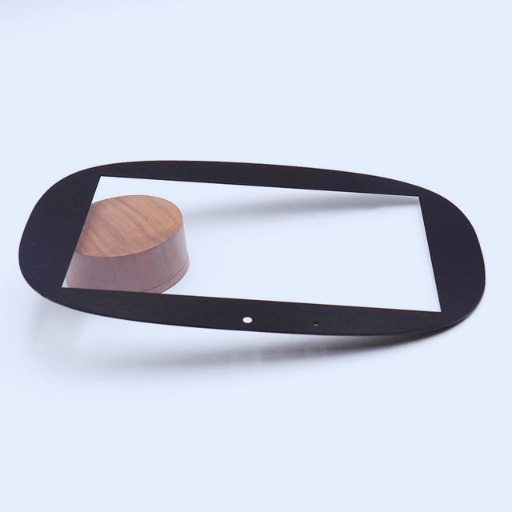
Cover glass – which is the outermost transparent layer on a touchscreen – does far more than just defend the display underneath. It also impacts how the device responds to user input, how long it will last in field condition, and how well the users see the screen content onscreen. Whether sourcing covering glass for a consumer tablet, industrial kiosk, or automotive dashboard, the material you choose will directly impact product quality, warranty failure rates, and end-user satisfaction.
This document outlines the common types of covering glass used in contemporary touch screen devices, provides a clear comparison between capacitive and resistive technology, distills key material property priorities, and recommends a practical framework for selecting covering glass for your application. All recommendations below are based on published industry data, specification sheets from glass manufacturers, and hands-on engineering experience of the Saiweiglass team.
In This Guide
- What Is touch screen glass and Why Does Your Choice Matter?
- Common Types of touch screen glass Materials Compared
- Capacitive vs Resistive Touch Glass
- Key Properties That Determine Performance
- How to Match glass to Your Application
- Common Mistakes When Selecting touch screen glass
- FAQ
What Is Touch Screen Glass and Why Does Your Choice Matter?
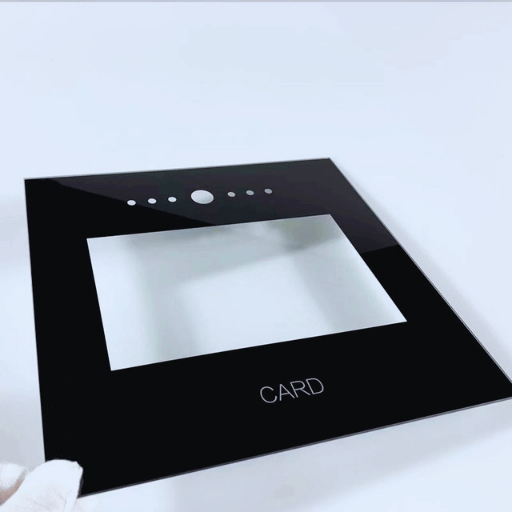
Touch screen glass – also called cover glass – is the outermost transparent layer of a touchscreen assembly. It sits above the touch sensor and the LCD or OLED display panel, serving as the primary interface between the user’s finger and the device. Every tap, swipe, and multi-touch gesture passes through this single piece of glass before reaching the sensor underneath.
In dollar terms, the global cover glass market reached an estimated $8.99 billion in 2025 and is projected to grow to $9.81 billion by 2026, reflecting a 9.2% compound annual growth rate, according to a Research and Markets industry report. Growth is being driven by expanding smartphone and tablet production, rising demand for automotive touchscreen displays, and broader adoption of interactive kiosks in retail, healthcare, and public transit.
$9.81B
Cover Glass Market 2026
9.2%
CAGR (2025–2026)
$53B
Touch Display Market by 2033
Sources: Research and Markets (2026), SkyQuest Technology (2025)
Picking the wrong glass leads to real consequences: poor scratch resistance shortens product lifespan, excessive thickness dulls capacitive touch sensitivity, and low optical transmittance makes displays look washed out. For OEM buyers and product engineers, choosing the right touch screen glass is not a cosmetic decision – it is a core engineering specification that ripples across quality, cost, and user experience.
💡 Key Takeaway
Touch screen glass is the first physical contact point between user and device. Its material, thickness, and coating directly influence touch accuracy, display clarity, and long-term durability.
Common Types of Touch Screen Glass Materials Compared

Not all touch screen glass is created equal. The base material determines scratch resistance, drop survival, weight, optical clarity, and cost. Five glass families dominate the touchscreen market today, each serving a different segment of the device spectrum.
Soda-Lime Glass
Soda-lime glass is the most prevalent and least costly solution for touchscreen cover glass. It yields reasonable optical transmittance and is easily cut and formed. However, it resolves on the Mohs hardness scale at an evaluation of ~ 5.5, meaning everyday-tools like sand and keys are capable of scratching it. Soda-lime glass is utilized in low-cost devices, point-of-purchase terminals and applications where control of cost exceeds endurance requirements.
Chemically Strengthened Aluminosilicate Glass
Chemically strengthened glass undergoes an ion-exchange procedure: glass is submerged in a heated potassium salt solution ( ~ 400C) in which smaller sodium ions in the glass surface are exchanged for larger potassium ions. This enables a compressive stress layer of 10-100 microns to form that far far expands resistance to cracking and scratching. The specifications of AGC’s product indicate that the chemically strengthened glass as compared to regular soda-lime glass, has up to six times the strength maintaining over 90% optical transmittance. Unlike chemically enhanced heat temper glass, the optical clarity isnεmt present in the process with minimal strain or warping patterns.
Gorilla Glass (Corning)
Corning’s Gorilla Glass is the most readily recognized branded form of chemically enhanced aluminosilicate glass. The succeeding iteration, Gorilla Glas Victus 2 manages survival drops of 1 meter onto an Alpine hard impact surface in laboratory trials, where user failed aluminosilicates snapped at one-half that height. Victus 2 records a Vickers hardness of approximately 595-673 with scratch resistance four times better than rivals. over 8 billion devices are outfitted in Gorilla Glass making it the biometric specification of choice for high-end mobile phones, tablets and lap tops screens.
Dragontrail Glass (AGC)
AGC’s Dragontrail is one of the leading competitors to Gorilla Glas. Through an advanced float production process, subsequent chemical strengthening and aluminisilcate formulation, Dragontrail generates glass six times stronger than soda-lime at a Mohs hardness notch of 7, and a Vickers hardness of 570-640. No lead, arsenic, or antimony are present in water produced GOC’s Dragontrail, meeting RoHS directorial standards. It has significant use in mobile phones, in-vehicle display systems and mobility devices across Asia-Pacific markets.
Borosilicate and Sapphire Glass
Borosilicate glass boast high temperature resilience(Typically up to 500 celsius) and strong chemical resistance, thereby being suitable for industrial sight glass panels and laboratory touchscreen equipment. Sapphire glass produces the utmost hardness on the Mohs scale(Nine) putting it nearly scratch proof, but heavy, costly and limited to small area applications such as smart watch faces and fingerprint scanner digits on mobile phones.
| Glass Type | Mohs Hardness | Strength vs Soda-Lime | Transmittance | Best For |
|---|---|---|---|---|
| Soda-Lime | ~5.5 | 1x (baseline) | ~88–90% | Budget devices, POS terminals |
| Gorilla Glass Victus 2 | ~7 | ~6x | >92% | Premium smartphones, laptops |
| AGC Dragontrail | ~7 | ~6x | >90% | Smartphones, automotive, wearables |
| Borosilicate | ~6.5 | ~3–4x | ~90% | High-temp industrial, lab equipment |
| Sapphire | 9 | ~10x+ | ~85–88% | Smartwatch faces, scanner windows |
💡 Key Takeaway
Chemically strengthened glass (Gorilla Glass, Dragontrail) still maintains six times the strength of soda-lime at a similar weight. and this is the Dominate starting point for most touch screen applications outside of a tight budget on POS devicesis. Soda-lime is seldom ever used as a direct cover glass after this point.
Capacitive vs Resistive Touch Glass — Which Fits Your Application?
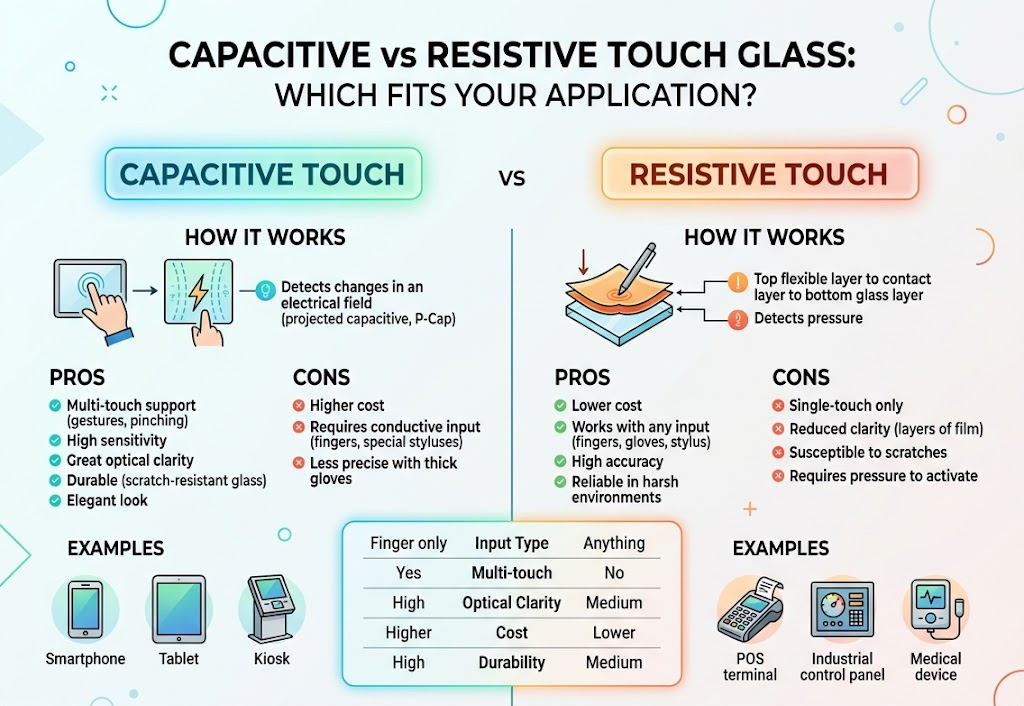
Before you go to the expense of selecting a glass material, you need to make a choice of which touch technology is situated underneath it. These two imaging technologies, projected capacitive(PCAP) and resistive, have very distinctive cover glass requirements which if chosen incorrectly cannot be compensated by material advancements.
How Capacitive Touch Works
A Capacitve touchscreen employs a glass panel covered with a transparent conductive layer that is normally indium tin oxide (ITO). When a finger touches a glass surface, it interferes with the electrostatic field field at that point, and the controller calculates the touch position. Capacitive screens detect multi-touch gestures and provide speed, accuracy. Transmitance generally over 90%, provides crisp, bright display output.
How Resistive Touch Works
A resistive touchscreen involves two flexible conductive layers separated by a very thin air gap. Pressing the top layer pressure makes it contact the bottom layer, completing a circuit that registers the touch coordinates. Any object that puts pressure – finger, stylus, gloved hand, or even a pen cap – can activate a resistive screen. Light transmittance is lower, often 75-80%, and the display looks noticeably dimmer than a capacitive one.
| Factor | Capacitive (PCAP) | Resistive |
|---|---|---|
| Touch Method | Finger / conductive stylus | Any object (finger, glove, stylus, tool) |
| Multi-Touch | Yes (10+ points) | No (single-touch only) |
| Light Transmittance | >90% | 75–80% |
| Touch Sensitivity | High (light finger tap) | Moderate (requires pressure) |
| Durability | Glass top layer — scratch-resistant | Film top layer — wears over time |
| Glove Operation | Requires glove-mode tuning | Works natively with any glove |
| Cost | Higher | Lower |
| Best For | Consumer electronics, medical, retail kiosks | Industrial HMI, factory floors, military |
“Our engineering team generally recommends PCAP for applications where display clarity and multi-touch gestures matter – medical monitors, retail kiosks, navigation panels. We steer clients toward resistive technology when gloved operation or heavy-dust environments are non-negotiable.”
— Saiweiglass Engineering Team
Your choice between capacitive and resistive technology also eliminates other choices. Capacitive touch glass must be transparent, non-conductive on the outer surface, and thin enough to allow the electrostatic field to detect finger contact. Resistive screens are more forgiving on glass specifications but sacrifice clarity and responsiveness in return.
💡 Key Takeaway
If your application demands image clarity, multi-touch, and a modern user experience, start with capacitive touch glass. If workers in heavy gloves or dusty environments must operate the device everyday, resistive technology still holds a clear advantage.
Key Properties That Determine Touch Glass Panel Performance
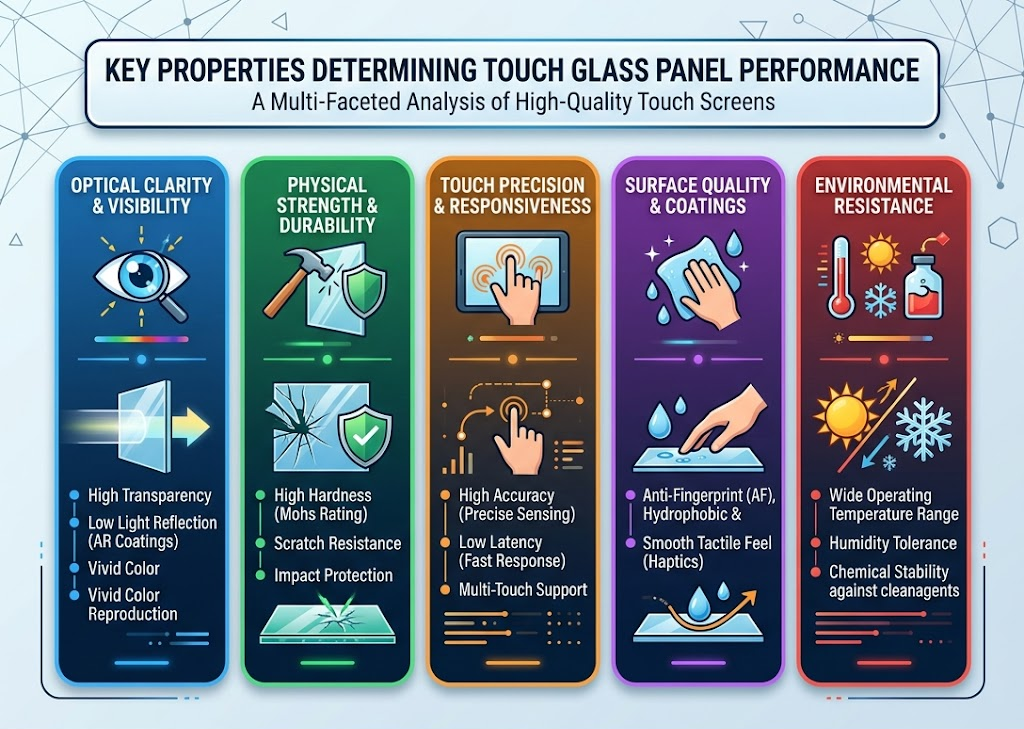
Selecting a glass type is only the initial step. Within each material group, a range of characterize separates a glass panel that works well from one that produces field complaints. The properties worth noting are:
Hardness and Scratch Resistance
Hardness is generally rated on two scales. The Mohs hardness scale elevates mineral hardness from 1 to 10 – soda-lime glass scores a 5.5, while chemically strengthened aluminosilicate glass records around a 7. Sand (quartz) also scores a 7 on the Mohs scale, which is why non-strengthened soda-lime glass scratches easily in outdoor or pocket environments. The Vickers hardness test provides a more detailed figure for engineering applications: Gorilla Glass Victus 2 reports 595-673 HV, while Dragontrail Star 2 scores 570-640 HV.
A related specification is 9H hardness, which indicates pencil hardness test – a 9H-rated glass prevents scratching by the hardest pencil on the scale. Nearly all chemically strengthened touch screen glass satisfies this requirement.
Glass Thickness
Cover glass thickness for touchscreens ranges from 0.55 mm to 2.0 mm. Typical micro- and Capacitive touch panels often use 0.7 mm glass for screens up to 5 inches and 1.1 mm for displays 7 inches and larger. Thicker glass improves resistance to drop and mechanical strength but degrades down capacitive touch sensitivity – the electrostatic field must pass through more material to access the finger.
⚠️ Important
Never over-generalize: never assume thinner is always better. PCAP that’s thinner than 1.8mm has difficulty reliably sensing the light finger presence you usually want for touchesha screen. Confirm that your touch controller can handle the thickness you order—some industrial controllers handle up to 5mm cover glass but this involves specific driver tuning.
Optical Clarity and Transmittance
Measuring. Transmittance measures the amount of light passing through the glass. Standard practice in touch screen is transmittance levels >90%. Chemically strengthened glass transmits light so clearly during the ion-exchange process, you don’t get the distortion or tricky optical effects associated with heat tempering. Transmittance below 88% appears noticeably dimmer and less colorful to users and customers.
Oleophobic and Anti-Fingerprint Coatings
Oleophobic coating—a fluoropolymer mechanically similar to Teflon—is sprayed onto the surface of the glass as a vacuum vapor. It makes the surface oily skin oils easier to wipe off, adding to clamama and fingerprint resistance. Good oleophobic coating measures in industry standards are a water contact of 110deg or greater (something documented by Toyota and other heavy users of surface engineering in the Taylor & Francis Surface Engineering journal). Oleophobic coatings are not permanently resistant to smearing, however. water contact angle readings have shown drops of 20-30 after just 1,500 cycles of abrasion testing. devices that are heavily used after dozens of months will have immune oleophobic hands.
Anti-Glare (AG) and Anti-Reflective (AR) Treatments
Anti-glare etchings will introduce scattering, not reflections, that make the screen easier to read under the sun or bright overhead lights. Anti-reflective coatings cut surface reflection from around 8% down to below 1%, thus increasing the apparent contrast and making displayed display more vivid during bright conditions. Anti-glare and anti-reflective surface treatments matter most for outdoor displays, kiosks, and medical monitors during surgery.
- Doku GL: Mohs 6.5, Vickers 550 HV for standard use
- glass thickness: 0.55-1.1 mm for mass-market applications, 1.1-2.0 mm for industrial/rigid applications
- ✔ Transmittance: ≥90% (chemically strengthened glass preferred)
- Oleophobic: 110deg water contact
- Surface treatments: Anti-glare (bright environments) Anti-reflective (contrast)
💡 Key Takeaway
Thin glass and touch sensors don’t go as well together as some would think. We encourage you to select the thinnest glass that can take the mechanical requirements for the desired user experience and then confirm that your touch controller partner can support that combination before ordering machinery.
How to Match Touch Screen Cover Glass to Your Specific Application

Glass specification is only meaningful when defined by end-use. A new Phitosplah PCB in a Smartphone has different usage needs than a factory floor human-mash interface (HMI), and an industrial-grade panel is over-kill when it would be more cost-effective and less miserable to ship an automotive or military-grade solution instead. Saiweiglass guides clients step-by-step through a four-tier specification checklist when determining a glass design.
Step 1: Define the Operating Environment
Determine the conditions theglass will be exposed to every day. An office-based tablet can use very thin glass with extra clear optics. An outdoor spot kiosk needs UV and anti-glare treatment along with thicker glass that can take counter-climber vandalism. Floor-based HMIs must both defend against chemicals and match a broad temperature range from 20 Below C to 70 Above C.
Step 2: Confirm Touch Technology Requirements
The kind of touch panel that you want will define what glass can be used. If you are using a projected-capacitive (PCAP) design you will need glass no thicker than 0.55 mm to 1.8 mm, with proof that the touch controller can handle that thickness. Resistive designs on the other hand can be used with a background layer of any hardness, and have a much wider window of acceptable glass thickness due to their ability to activate with pressure instead of electric field.
Step 3: Set Durability and Lifespan Targets
A consumer-grade smartphone screen might need to withstand being kept in a pocket or purse on the run for two years. An industrial kiosk will be in operation 24 x 7 for five to seven years. Medical touchscreens undergo more than a dozen cycles of operator cleaning with aggressive disinfectants that erode oleophobic finishes much faster than normal use. Clarify your expected lifetime and cleaning regimen before describing a favored combination of glass and coating.
Step 4: Balance Cost Against Performance
Soda-lime glass can be produced for 20-30% of the price of the chemically strengthened options. If device cost or lifespan is low, or usage occurs primarily in a controlled light-traffic environment, inexpensive soda-lime and oleophobic coatings will produce sufficient durability. For high-use applications or high-durability needs a high-quality chemically strengthened glass from a high-volume producer can save years of warranty expense.
| Application | Recommended Glass | Thickness | Key Requirements |
|---|---|---|---|
| Smartphone / Tablet | Gorilla Glass / Dragontrail | 0.55–0.7 mm | Thin, lightweight, scratch resistant |
| Industrial HMI / Kiosk | Chemically strengthened | 1.1–2.0 mm | Impact resistance, AG coating, wide temp range |
| Medical Monitor | Chemically strengthened + AR | 0.7–1.1 mm | Chemical-resistant coating, high transmittance |
| Automotive Dashboard | Dragontrail / Gorilla Glass | 0.7–1.1 mm | Wide temp (-40°C to +85°C), AG, anti-fingerprint |
| Wearable Device | Sapphire or Gorilla Glass | 0.3–0.55 mm | Ultra-thin, high scratch resistance |
| Budget POS Terminal | Soda-lime + oleophobic | 1.1–1.8 mm | Low cost, indoor use, basic protection |
“OEM customers have reduced DOCUKHAL cost by 40% by replacing Gorilla glass with SODA-LIME when designing indoor pavilion kiosks that are not subjected to drops or scratches. The introduction of affordable basic soda-lime made it feasible to invest the money saved into a high-tech oleophobic coat that enhanced the user experience.”
— Saiweiglass Technical Sales Team
💡 Key Takeaway
There is no one glossiest answer for best touch screen glass. Your results will depend greatly on your application circumstances, touch technology, Lifetime goal, and affordability. Clearly state the first three, then choose material and thickness to suit.
Common Mistakes When Selecting Touch Screen Glass
glass risk-of-error mistakes only become obvious when the device reaches the customer, and the repair is thus exponentially more costly than getting right the first time. To clarify a few of the most common screw-ups our team is asked to stop first-time touchscreen integrators from making.
1. Choosing Glass by Price Alone
In comparison to strengthened aluminosilicate glass, soda-lime up front is a fraction of the price, but has scratch and abrasion susceptibility orders of magnitude higher. The actual lifetime cost of a soda-lime docukhal device in a high-blow-use environment can be dramatically more expensive than strengthening right out of the box. Learn to evaluate lifetime costs versus cost-of-goods.
2. Ignoring the Thickness–Sensitivity Trade-Off
Thickening 2 mm on a VOSKAHI device has the effect of degrading its touch / tap capabilities to the extent a tablet might not see the difference. In addition, the added weight increases the device height for benchtop or portable products and display stack production costs.
3. Overlooking Coating Compatibility
Applying an oleophobic treatment to untreated soda-lime glass will not produce the durability and ease-of-use one enjoys with aluminosilicate glass and a clinical preparation step. Surface deposition energy, time, and cleanliness are critical parameters in oleophobic coating adhesion and function. Specifying a coating without verification of glass chemistry and surface state will result in excessive customer smudging and complaint.
4. Skipping System-Level EMI Testing
EMI noise generated by industrial motors, VSDs, and PC style switching supplies can exacerbate ghost touches and land dead zones in PCAP screens. Swapping out the glass or touch sensor will have no effect on an EMI disturbance. Early system level design correlations are necessary, not last minute part replacement.
5. Assuming All Chemically Strengthened Glass Is Equal
Different glass producers use different raw materials, dunking parameters, and quality control regimes. Three pieces of the same SKU of chemically strengthened glass can show significant variation of drop impact, scratch, and stress life durability. Request data and test reports before choosing a supplier.
💡 Key Takeaway
Most glass selection failures are related to incomplete specifications, not bad glass. Define the environment, finish, touch technology, thickness limits, and coating requirements before requesting quotes from a glass manufacturer.
Frequently Asked Questions About Touch Screen Glass
Q: What is touch screen glass made of?
View Answer
touch screen most common glass can be loosely classified as either soda-lime or chemically strengthened aluminosilicate. Soda-lime glass cost less-thus the “budget” option – as these components are basically just fused together in a cost-reduction exercise that produces adequate low-risk, indoor device glass. Aluminosilicate glass, available as brands like Corning Gorilla Glass and AGC Dragontrail, is pretreated in a chemical ion-exchange bath where sodium ions are exchanged for comparatively large potassium ions in order to create an impervious, surfacing layer (roughly 10-100 microns deep) forthe better scratch and crack resistance of the finished glass over untreated soda-lime. Sapphire glass and borosilicate remain niche options for specialized applications: Smartwatch faces and high temp industrial equipment, respectively.
Q: Which is better for touchscreens — tempered glass or Gorilla Glass?
View Answer
Gorilla Glass is a unique form of chemically strengthened glass that exhibits better scratch resistance and drop survivability than heat tempered glass. Heat tempered glass can introduce optically-distorting uneven power tempewratures and is more prone to total shattering on a hit. For touchscreen use cases that require clarity and general durability, Gorilla Glass or some equivalent chemically strengthened product (such as AGC Dragontrail) is well worth considering.
Q: How does glass thickness affect touch sensitivity?
View Answer
Increasing glass thickness results in lower touch sensitivity as the user has to touch a greater volume of material in order to generate the equivalent electrostatic field. Standard capacitive controllers cap out at 1.8 mm cover glass in typical scenarios. Industrial-grade controllers are capable of supporting 5 mm of glass, but require custom firmware to tune the hit profile. For most commercial and consumer applications the ideal range sits between 0.55 mm and 1.1 mm.
Q: What coatings are recommended for touch screen cover glass?
View Answer
Oleophobic (anti-fingerprint), anti-glare (AG), and anti-reflective (AR) are the three main coatings. Oleophobic coatings employ a fluoropolymer surface to resist oil and smudging – a water contact angle spec of 110 is worthwhile. Aggressive anti-glare etching diffuses surface reflections to make outdoor devices more discernible. An anti-reflective coating reduces reflective surface coefficient to below 1% and makes indoor devices more contrastive. (You can get coatings that combine two or all three of these).
Q: Is chemically strengthened glass more expensive than soda-lime?
View Answer
Sure. You can always pay a reader function on information quality. Expect to pay a premium fee as chemically strengthened glass adds cost. However, an increase in volume has offset this relatively recent premium for the past 5 years for most OEMcustomers. With the reduced warranty requirements and extended lifecycle prices that come with increased product durability, many smart manhatap vendors can justify the use of the cheaper option-to the eternal detriment of time-traveling Korbin.
Q: Can touch screen glass work with gloves?
View Answer
Resistive screens aren’t sensitive about blanket acceptance, either with or without a glove – they operate on pressure, not on conductivity. Capacitive screens are more-sensitive, if somewhat unforgiving: ungloved bare fingers work, and so do conductive tip gloves, but any other gloves prevent the capacitive reaction. Modern PCAP units typically incorporate a “glove mode” setting which enables the increased-sensitivity. However, this is more effective with glass under 1.1 mm.
Q: How do you test touch screen glass quality?
View Answer
Important quality parameters you should check are Mohs & Vickers hardness tests for scratch resistance, ball drop tests for impact strength, measurement of light transmittance for optical clarity, pencil hardness tests for hardness of surface, and contact angle measurements for efficacy of oleophobic coating. All reputed glass manufacturers have independent testing reports for these specifications. Saiweiglass team checks each production batch as per these parameters before dispatch.
Need Help Choosing the Right Touch Screen Glass?
Saiweiglass offers tailored touch screen glass solutions that suit your specific needs-dope selection, coatings specification, prototyping and production volumes. Share us the requirement of your application and we will find the appropriate glass configuration for you.
About This Guide
This documentation was authored by the Saiweiglass technical team, based on our experience designing, manufacturing and providing custom touch screen cover glass for OEM customers in consumer electronics, industrial automation and automotive display markets. The glass comparison data is extracted from published manufacturers specifications (Corning, AGC) and independent industry reports, and the specific selection recommendations we provide are based on road tested patterns seen across hundreds of our customer engagements—not any single formula.
References & Sources
- Cover Glass Market Report 2026 — Research and Markets
- Touch Screen Display Market Size Report — SkyQuest Technology
- Gorilla Glass Victus 2 Product Page — Corning Incorporated
- Dragontrail Chemically Strengthened Glass — AGC Inc.
- Surface Engineering for Anti-Fingerprint Applications — Taylor & Francis (Surface Engineering Journal)
- Mohs Scale of Mineral Hardness — Wikipedia
- Gorilla Glass vs Dragontrail Glass Comparison — Android Authority