Get in Touch with Saiweiglass

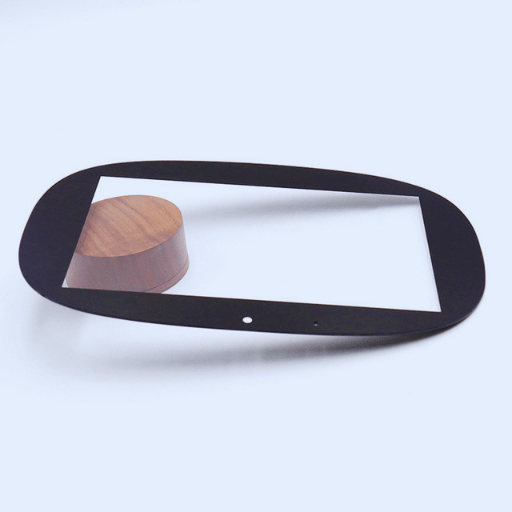
Cover glass has numerous functions. It offers impact protection to the display and supports user input. It also influences the field failure rate and how users perceive the contents on the display. Covering glass used in a consumer tablet or an industrial kiosk or automotive dashboard has a significant role on the overall quality of the end product, field failure rate and ultimate user satisfaction.
This document discusses the major types of covering glass found in today’s touch screen devices, elaborates on the difference between capacitive and resistive technologies, summarizes important material property priorities, and presents a way to select the appropriate covering glass for an application. It is recommended that product specific tests and the conditions thereof be agreed upon with the suppliers prior to final material selection.
In This Guide
- What Is touch screen glass and Why Does Your Choice Matter?
- Common Types of touch screen glass Materials Compared
- Capacitive vs Resistive Touch Glass
- Key Properties That Determine Performance
- How to Match glass to Your Application
- Common Mistakes When Selecting touch screen glass
- FAQ
What Is Touch Screen Glass and Why Does Your Choice Matter?
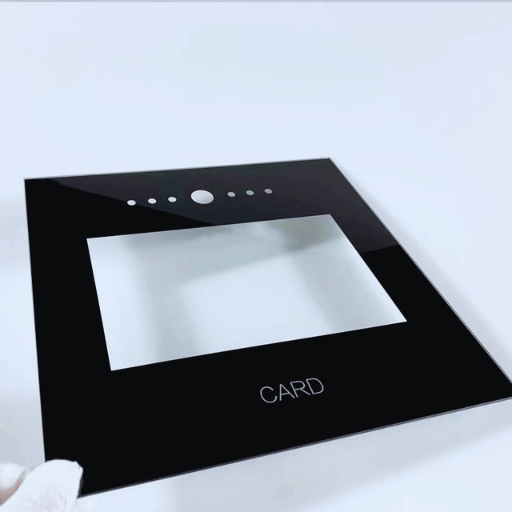
Touch screen glass (sometimes called cover glass) is the outermost transparent layer of a touch screen assembly. It is the first layer that the user’s finger touches and is the interface between the user and the device. This glass is placed directly above the touch sensor and the LCD/OLED display panel. This glass is a vital part of a touch screen since it transmits all touch input to the touch sensor.
In dollar terms, the global cover glass market reached an estimated $8.99 billion in 2025 and is projected to grow to $9.81 billion by 2026, reflecting a 9.2% compound annual growth rate, according to a Research and Markets industry report. Growth is being driven by expanding smartphone and tablet production, rising demand for automotive touchscreen displays, and broader adoption of interactive kiosks in retail, healthcare, and public transit.
$9.81B
Cover Glass Market 2026
9.2%
CAGR (2025–2026)
$152.94B
Touch Display Market by 2033
Sources: Research and Markets (2026), SkyQuest Technology
Selecting the wrong touch screen glass has very real consequences. Choosing glass with poor scratch resistance reduces the lifetime of the product. Increased thickness of the glass reduces touch sensitivity. High light transmission of touch screen glass is important for a display to be color accurate. Choosing the wrong touch screen glass can negatively affect the user experience. OEM buyers and product engineers need to select the right touch screen glass, as this affects the overall user experience and helps control cost and quality.
💡 Key Takeaway
Touch screen glass is the first physical contact point between user and device. Choices made regarding the material, thickness, and coating of touch screen glass, affect many things including touch accuracy, display clarity, and long-term durability.
Common Types of Touch Screen Glass Materials Compared

There are many properties to consider when selecting cover glass for touch panels. These include scratch resistance, drop performance, weight, optical clarity, and cost. There are trade-offs for every property. The sections below analyze material families and cover glass products; distinguish performance of the finished panel.
Soda-Lime Glass
Soda-lime glass is another option to evaluate for touchscreen cover glass. Clear float glass can also provide optical clarity, and can be cut to size. For budget devices and point-of-purchase terminals, obtain quotes and evaluate scratch and impact performance and optical performance for the proposed panel.
Chemically Strengthened Aluminosilicate Glass
Chemically strengthened glass can be strengthened by ion exchange. Corning describes a molten-salt bath at approximately 400 °C, where larger potassium ions replace smaller sodium ions and create surface compression. Confirm the compression depth and surface stress for the selected glass and process. For AGC’s product, request grade-specific strength and optical data rather than applying one strength multiplier or transmittance value to all chemically strengthened glass.
Gorilla Glass (Corning)
Corning’s Gorilla Glass is a branded chemically strengthened aluminosilicate glass. In Corning’s laboratory tests, Gorilla Glass Victus 2 survived drops up to 1 meter onto surfaces replicating concrete; competing aluminosilicate glasses typically failed at 0.5 meter or less. Its product sheet lists Vickers hardness at a 200 g load as 595 kgf/mm² before strengthening and 670 kgf/mm² after strengthening, and reports up to four times the scratch threshold of competing aluminosilicate glasses in its specified test. Corning reports Gorilla Glass use in more than 8 billion devices. Laboratory results do not guarantee finished-device drop survival.
Dragontrail Glass (AGC)
Dragontrail, an aluminosilicate cover glass series manufactured by AGC using the float process and suited for chemical strengthening, includes original Dragontrail. According to AGC, original Dragontrail is six times stronger than conventional soda-lime glass; request test conditions and current grade-specific data before using that comparison. AGC states that its process does not use lead, arsenic or antimony. Request a current RoHS declaration for the exact supplied product rather than inferring compliance from those three substances alone. AGC identifies potential applications of its cover glasses in smartphones, tablets and automotive displays.
Borosilicate Glass and Sapphire
Borosilicate glass offers thermal and chemical resistance, but has limits, and they vary by grade and exposure. For example, SCHOTT specifies BOROFLOAT 33 for up to 500 °C for less than 10 hours and 450 °C for longer exposure; these are glass-material limits, not touchscreen-assembly ratings. Sapphire is crystalline rather than glass and has Mohs hardness 9. Sapphire is scratch resistant (not scratch proof) and is not limited to small windows. Assess the size, impact resistance, and the optical requirements of the material. Consider the cost.
| Glass Type | Mohs Hardness | Strength vs Soda-Lime | Transmittance | Best For |
|---|---|---|---|---|
| Soda-Lime | Request grade-specific Mohs test data | 1x (baseline) | Confirm for the specified grade, thickness and coatings | Budget devices, POS terminals |
| Gorilla Glass Victus 2 | Not specified in the cited product sheet | Request a test-specific comparison | ≥90.5% at 0.7 mm thickness | Premium smartphones, laptops |
| AGC Dragontrail | Request grade-specific Mohs test data | Request a grade- and test-specific comparison | Confirm for the specified grade, thickness and coatings | Smartphones, automotive, wearables |
| Borosilicate | Request grade-specific Mohs test data | Request a test-specific comparison | Confirm for the specified grade, thickness and coatings | High-temp industrial, lab equipment |
| Sapphire | 9 | Request a test-specific comparison | Confirm for the specified thickness, wavelength range and coatings | Smartwatch faces, scanner windows |
💡 Key Takeaway
Assess chemically strengthened glasses such as Gorilla Glass and Dragontrail against your impact and scratch requirements. Evaluate the optical quality and cost of the product against your requirements. Request product-specific test results and compare them to soda lime glass. One strength multiplier doesn’t apply to all grades of chemically strengthened glass or finished panels.
Capacitive vs Resistive Touch Glass, Which Fits Your Application?
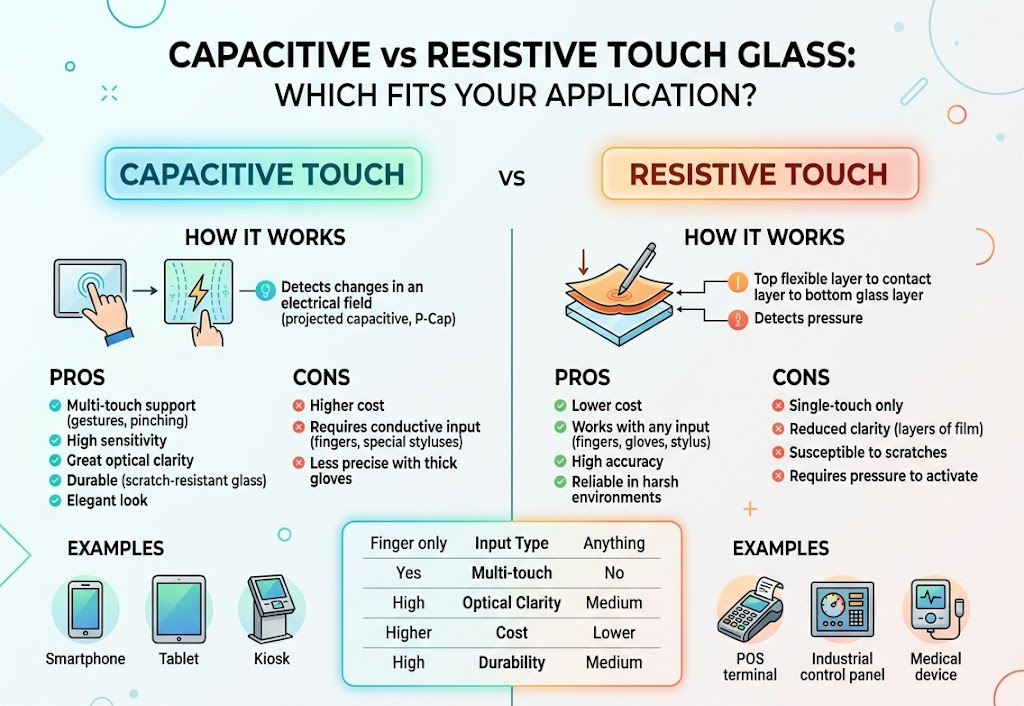
Ensure the touch technology and panel construction are defined before specifying a glass material. Different touch-sensing technologies have different requirements. Confirm the glass against the touch-panel manufacturer’s approved construction.
How Capacitive Touch Works
A PCAP touch screen is made up of a sensor electrode layer and a controller. A finger proximity to the sensor causes a change in capacitance and is detected by the controller to determine touch position. Depending on the model, it can also identify and track multiple touches. Confirm optical transmission for the complete panel rather than assuming every capacitive touchscreen exceeds 90%.
How Resistive Touch Works
A resistive touch screen is made up of a covered flexible conductive layer above a coated glass substrate separated by spacers. Touch pressure brings the conductive layers into contact, allowing the controller to determine touch position. Depending on the model, input from finger, glove and a stylus can be supported; follow the requirements of contact tip and force. Compare measured panel performance rather than assuming a fixed 75-80% value or a guaranteed increase in panel brightness.
| Factor | Capacitive (PCAP) | Resistive |
|---|---|---|
| Touch Method | Finger / conductive stylus | Finger, glove or suitable stylus; confirm activation force |
| Multi-Touch | Supported touch count depends on the controller | Often single-touch; dual-touch designs also exist |
| Light Transmittance | Confirm measured transmission for the complete PCAP panel | Confirm measured transmission for the complete resistive panel |
| Touch Sensitivity | High (light finger tap) | Moderate (requires pressure) |
| Durability | Glass top layer — scratch-resistant | Film top layer — wears over time |
| Glove Operation | Controller- and glove-dependent; confirm tuning needs | Pressure-operated; validate the intended gloves |
| Cost | Compare quotations for the required specification | Compare quotations for the required specification |
| Best For | Consumer electronics, medical, retail kiosks | Industrial HMI, factory floors, military |
Ask the touch-panel supplier to demonstrate the required image clarity, gestures and glove operation under your expected dust, moisture and electrical-noise conditions before choosing PCAP or resistive technology.
Touch-panel selection checklist
Depending on the touch-technology, the construction of a touch panel varies. For a PCAP, validate the cover material, thickness and coatings. For a conventional resistive touch panel, the cover material must flex to make contact. Ensure the construction is approved prior to adding a cover. Compare measurement of optical performance rather than relying on the assumptions.
💡 Key Takeaway
If multi-touch and image clarity is important, consider PCAP. For heavy gloves or dusty environments, consider qualified PCAP and resistive touch panels with the gloves and environments of interest, before making a decision.
Key Properties That Determine Touch Glass Panel Performance
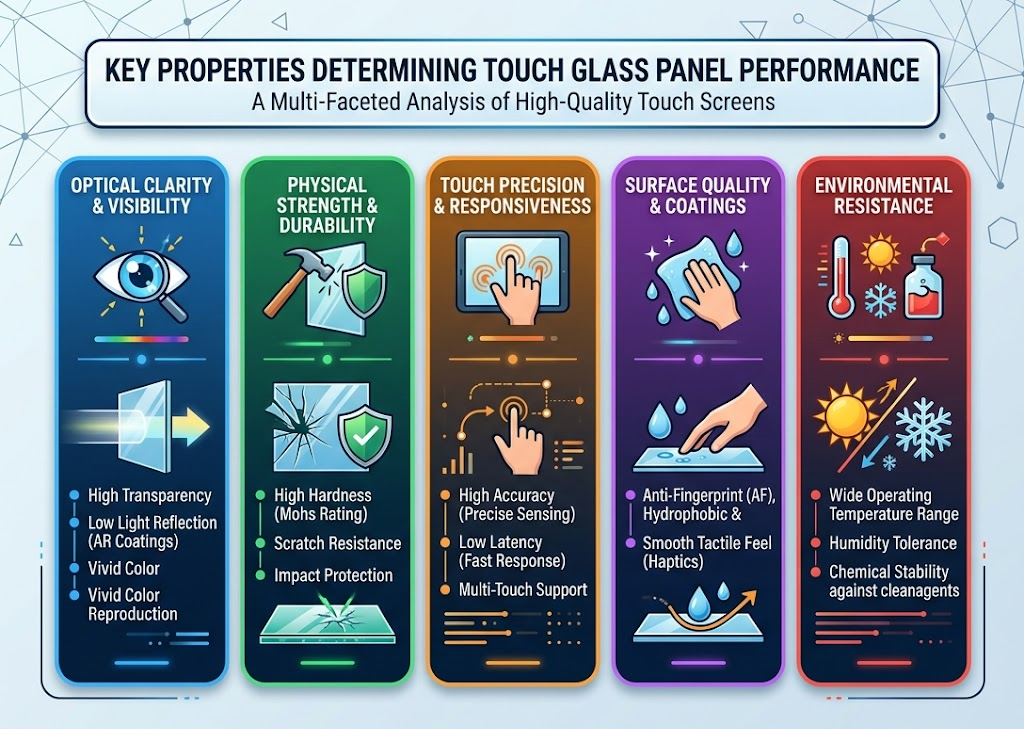
Choosing a type of glass is just the start. Within a single material group, there are variances of properties that differentiate a glass panel that works well from one that generates field complaints. Some of the key properties are:
Hardness and Scratch Resistance
Regarding scratch resistance, higher numbers on the Mohs hardness scale indicate more scratch resistance. Measuring indentation hardness is done through the Vickers test. Results for the exact glass grade and strengthened state are required. Test conditions are also important. Instead of giving a generic value to the entire material family, results for the tests done for the glass are required.
A 9H pencil-hardness rating is a separate coating-test result, not Mohs hardness 9 or a guarantee against everyday scratches. Confirm the acceptance criterion, pencil-test method and tested substrate. Not all chemically strengthened glass has the same rating.
Glass Thickness
There is no universal rule regarding the thickness of cover glass based on the size of the display. Touch sensitivity also plays a role, and a thicker cover glass reduces capacitive sensitivity. Thickness is determined mechanically and using touch performance of the final assembly.
⚠️ Important
There are trade-offs for thickness. Thinner glass results in better capacitive touch sensitivity, but a thicker piece of cover glass can lead to worse touch sensitivity and 1.8 mm is not a universal limit. Confirm the supported glass thickness for the intended sensor and touch input before ordering.
Optical Clarity and Transmittance
Transmittance indicates the amount of light that passes through the glass. Other properties such as the thickness of the glass, wavelengths, and types of coatings affect the value. Distinguish between results for glass only and results for a complete panel. Check display brightness and contrast in the intended lighting rather than applying a universal 88% visibility threshold.
Oleophobic and Anti-Fingerprint Coatings
Oleophobic coatings can lessen oil adhesion and make fingerprint residues easier to remove. Coatings can be applied using many different methods. Some of those methods include spraying or vapor deposition. Ask for data showing water and oil repellency before and after specified abrasion and cleaning tests. When referring to the Taylor & Francis Surface Engineering journal, check the exact study, coating, substrate and test conditions and then determine if the results are applicable to your product.
Anti-Glare (AG) and Anti-Reflective (AR) Treatments
Anti-glare surfaces scatter reflected light to reduce distracting glare. Anti-reflective coatings can also be applied to glass. Reflection varies based on the coating, wavelength and viewing angle. The result also depends on whether one or both glass surfaces are treated. For outdoor displays, kiosks and medical monitors, compare reflectance, haze and image clarity under the intended lighting rather than assuming every treatment reduces reflection from 8% to below 1%.
- Hardness: request grade-specific scratch and indentation test results
- Glass thickness: Verify mechanical performance and compatibility with the sensor and controller in the proposed assembly.
- ✔Transmittance: agree with glass-only and complete-panel requirements for specified thicknesses and coatings.
- Oleophobic: agree with water- and oil-repellency criteria and post-abrasion test conditions
- Surface treatments: Anti-glare (bright environments) Anti-reflective (contrast)
💡 Key Takeaway
Choose a cover-glass thickness that meets the mechanical requirements and touch performance with the actual sensor and controller, and validate this before ordering glass.
How to Match Touch Screen Cover Glass to Your Specific Application

The specification of glass is meaningless unless defined by its end-use. A smartphone and a human-machine interface (HMI) on a factory floor may have differing performance and usage requirements. Define the actual environment and performance and functional requirements rather than rely on labels such as industrial, automotive, military grades, etc. Use the following four steps to define your glass requirements.
Step 1: Define the Operating Environment
Determine the conditions that the glass will be subjected to on a daily basis. For an office tablet, define the optical and mechanical requirements. For a kiosk deployed outdoors, define requirements for readability in ambient light and sunlight, and UV and impact and/or vandalism tests. For a HMI on a factory floor, define the chemicals, cleaning procedures and operating-temperature range. Confirm requirements for the complete assembly.
Step 2: Confirm Touch Technology Requirements
The touch-panel design determines the compatible construction. For PCAP, verify the supported cover thickness with the sensor and controller suppliers; 0.55-1.8 mm is not a universal limitation. For resistive panels, verify the approved substrate and flexible front-layer construction rather than assuming any glass hardness and/or thickness is acceptable.
Step 3: Set Durability and Lifespan Targets
Specify the expected service life, daily operating hours and anticipated use (e.g., insertion, removal). For medical touchscreens, identify the disinfectants and cleaning agents, concentrations, contact times and frequency, and request coating-compatibility tests for the intended conditions and duration. State your expected lifetime, cleaning and/or protective treatment and state a preferred glass/coating combination.
Step 4: Balance Cost Against Performance
Request comparable quotations for soda-lime and chemically strengthened glass with the same dimensions, finish, coating, quantity and inspection requirements. Compare glass costs, application-related durability results and expected replacement costs prior to specifying the glass.
| Application | Glass Options to Evaluate | Thickness | Key Requirements |
|---|---|---|---|
| Smartphone / Tablet | Gorilla Glass / Dragontrail | Confirm grade, mechanical performance and touch-stack compatibility | Thin, lightweight, scratch resistant |
| Industrial HMI / Kiosk | Chemically strengthened | Confirm impact performance and approved touch-panel construction | Impact resistance, AG coating, wide temp range |
| Medical Monitor | Chemically strengthened + AR | Validate with the selected sensor, controller and bonding stack | Chemical-resistant coating, high transmittance |
| Automotive Dashboard | Dragontrail / Gorilla Glass | Confirm mechanical qualification and touch-stack compatibility | Confirm assembly operating-temperature range, AG, anti-fingerprint |
| Wearable Device | Sapphire or Gorilla Glass | Confirm material, dimensions, impact performance and touch compatibility | Ultra-thin, high scratch resistance |
| Budget POS Terminal | Soda-lime + oleophobic | Confirm approved thickness and front-layer construction for the touch technology | Low cost, indoor use, basic protection |
Would a soda-lime option meet the kiosk’s impact, scratch and cleaning requirements at a lower quoted cost? Request comparable samples and quotations before changing the glass or coating specification.
Questions for your supplier
💡 Key Takeaway
There is no best touch screen glass for every application. Your expected lifetime, budget, touch technology and operating conditions will determine the results. Define these requirements, then choose material and thickness to meet your needs.
Common Mistakes When Selecting Touch Screen Glass
Check glass-selection requirements before production to reduce field failures and costs associated with glass replacement. Cover the following with your glass and touch-panel suppliers.
1. Choosing Glass by Price Alone
Compare quotations for the same requirements and use application-specific scratch, impact and cleaning tests to assess the suitability of the options. Evaluate lifetime costs with first costs to finalize the options.
2. Ignoring the Thickness, Sensitivity Trade-Off
Increasing cover thickness can reduce capacitive coupling. Test each thickness with the actual sensor, controller and complete display stack, including the intended finger, glove or stylus input.
3. Overlooking Coating Compatibility
Ask the coating supplier to confirm compatible glass substrates, surface preparation and application conditions. Request adhesion, abrasion and cleaning results for the proposed glass-and-coating combination.
4. Skipping System-Level EMI Testing
Electrical noise can affect PCAP operation. Test the assembled device with its display, power supply and other equipment in operation. Investigate other design changes (e.g. sensor shielding and grounding; controller firmware and settings) rather than assuming a change in the sensor or glass can never affect the result.
5. Assuming All Chemically Strengthened Glass Is Equal
Confirm the glass grade and strengthening specification. Verify the requirements of the finished part, and the inspection criteria. Request data and test reports prior to selecting a supplier.
💡 Key Takeaway
Incomplete specifications can lead to failures when selecting glass for an application. Determine the environmental conditions and finish requirements. Also define the touch technology and thickness limits, and consider coating requirements, prior to requesting quotes.
Frequently Asked Questions About Touch Screen Glass
Q: What is touch screen glass made of?
View Answer
Cover-glass options include soda-lime and chemically strengthened aluminosilicate glass, including products such as Corning Gorilla Glass and AGC Dragontrail. Ion exchange creates surface compression; it does not make the glass impervious to damage. Borosilicate glass and crystalline sapphire are other options for specialized requirements. Confirm the exact material, strengthening specification and finished-panel test results with your supplier.
Q: Which is better for touchscreens, tempered glass or Gorilla Glass?
View Answer
Gorilla Glass is chemically strengthened glass. A comparison with heat-tempered glass needs the exact grades, thicknesses, processing conditions and test methods. Request matched optical, scratch, impact and breakage results for the proposed panels before choosing; a brand name alone does not establish better performance in every application.
Q: How does glass thickness affect touch sensitivity?
View Answer
Increasing cover-glass thickness can reduce capacitive coupling between the finger and sensor. Supported thickness depends on the sensor, controller, bonding layers and input method; 1.8 mm is not a universal ceiling, and 0.55–1.1 mm is not a universal optimum. Confirm the controller’s specifications and validate the complete assembly before ordering.
Q: What coatings are recommended for touch screen cover glass?
View Answer
Options include oleophobic anti-fingerprint coatings, anti-glare (AG) surface treatments and anti-reflective (AR) coatings. Oleophobic coatings help with oil repellency and cleaning; AG scatters reflected light, while AR reduces reflection. Ask for reflectance, haze, cleanability and abrasion results for the proposed treatment combination. A 110° water contact angle or reflection below 1% is not a universal requirement or guaranteed result.
Q: Is chemically strengthened glass more expensive than soda-lime?
View Answer
Ask for like-for-like quotations for soda-lime and chemically strengthened options using the same dimensions, finish, coating, quantity and inspection requirements. Compare those prices with application-specific durability results and expected replacement costs; the price difference and lifetime savings need confirmation for your project.
Q: Can touch screen glass work with gloves?
View Answer
Glove operation depends on the touch system and glove. Resistive panels respond to pressure and can support gloved input. Some PCAP systems also support ordinary work gloves through suitable sensing and configuration. Ask the supplier to demonstrate your glove material and thickness with the intended cover glass, including wet or dirty conditions where relevant.
Q: How do you test touch screen glass quality?
View Answer
Agree a test plan covering scratch resistance, indentation hardness, impact performance, optical transmission and coating durability as required by the application. Distinguish Mohs scratch testing, Vickers indentation testing and pencil testing of suitable coating films. Specify impact-test conditions and coating-repellency measurements. Ask which reports are available, whether testing is independent, and what batch sampling and acceptance criteria will apply to your order.
Need Help Choosing the Right Touch Screen Glass?
Send your application details, expected quantities, drawings, and descriptions of the coating and touch panels required to Saiweiglass. Inquire what material and processing options and what prototype and production quantities the company can support. Provide your specifications.
About This Guide
Use the information in this guide to prepare questions to ask potential glass and touch panel suppliers. Request manufacturer data and application-specific tests for the material, processing and coatings prior to placing your order.
References & Sources
- Cover Glass Market Report 2026 Research and Markets
- Touch Screen Display Market Size Report SkyQuest Technology
- Gorilla Glass Victus 2 Product Page Corning Incorporated
- Dragontrail Chemically Strengthened Glass AGC Inc.
- Surface Engineering journal Taylor & Francis
- Mohs Scale of Mineral Hardness Wikipedia
- Gorilla Glass vs Dragontrail Glass Comparison Android Authority